Showing posts with label Uncertainty. Show all posts

Sunday, 9 June 2019

Waterfall is for Losers?


Perhaps that is a bit harsh, but in the question of whether Agile or Waterfall is best, the reality is that Agile ends up being multiple small waterfall cycles.  So you end up doing Waterfall in pieces.

All projects are composed of a set of tasks, typically executed by multiple people.  Within your set of tasks, some are dependent on others.  In particular we can never get away from the fact that to implement any single requirement, we need to analyse the requirement (what), design the solution (how), code the solution (execute), and test the result.

So any iterative and incremental project, i.e. Agile, Scrum, RAD, XP, etc.  Is really a series of small waterfalls.  The difference is that between the waterfalls we have sandwiched requirements, analysis, design, and coding which gives us the ability to change direction when we need to.

Note: If you never need to change direction (which is not often :-)) then Waterfall is a viable option.  Waterfall makes the most sense in projects where there is little to no requirements or technical uncertainty*, e.g. reimplementing a system with experienced developers in a new technology where the use cases for the previous system are not changing.

The typical waterfall project assumes the above picture, that all requirements can be done then all design all coding and then all testing.  It is based on a 1960's factory mentality that code can be assembled like a car on an assembly line.

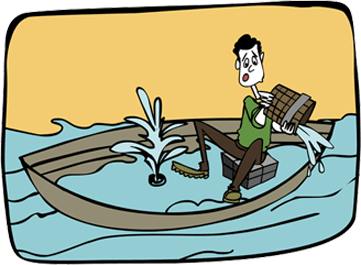
Waterfall only works if the amount of rework in any phase is immaterial and does not materially affect the length of the project.  Typically this is not true.  In the presence of requirements uncertainty, requirements need to be revisited many times.  Often, missing or inconsistent requirements will cause scope to change requiring change requests in the process.

All change requests will affect the project schedule.

In the presence of technical uncertainty, design needs to be revisited many times.  Often when using newer APIs the API is not documented or even worse, the code mechanism from the creator/vendor simply does not work and requires technical work arounds that materially affect the project schedule.

This will create a change request that will affect the project schedule.

An agile project builds requirements and design into every sprint.  This allows you to change directions when either requirements or technical decisions are uncertain.
This is the series of small waterfalls -- you are still doing Waterfall, but in an Agile way.

When you add up all the sprints of a project, you will realize that you have done the same project (i.e. the work is the work), but you have sliced it up differently.
So it is not a question of whether you will be doing Waterfall or not.  It is a matter of what is the sprint cycle that will support the requirements and technical uncertainty of your project.  If your project has little to no uncertainty, then your sprint cycle is the entire project.

If your project has requirements or technical uncertainty, then sprint cycles of 2-3 weeks are ideal.

*Note: Similar to requirements and technical uncertainty are projects where there are significant dependencies on client interaction, so schedule uncertainty can also drive the need for agile project management.


Other articles in the "Loser" series

Want to see more sacred cows get tipped? Check out
Make no mistake, I am the biggest "Loser" of them all.  I believe that I have made every mistake in the book once :-)

Monday, 12 October 2015

Do Project Managers need Domain Experience?

Opinions vary on whether a project manager needs to have domain experience.  Certainly project managers that do not have domain experience will be the first to say that domain experience is not necessary as long as they have access to excellent subject matter experts.

I would advocate a more nuanced position; that is, a project manager does not need domain experience IF his subject matter experts understand the risks and dependencies that are inherent to the domain.

Let's go through a couple of personal projects that I have been involved with where the project manager did not have domain experience.

Telco Project

I am currently involved in a project that involves a LAN/WAN/WIFI upgrade of a large customer for a large telecommunications company.  The project manager does not have domain expertise in networks and is counting on the subject matter experts to provide him sufficient input to execute the project.

The subject matter experts are so advanced in their knowledge of networks that they no longer understand what beginners (i.e. the project manager) do not know.  They have assumed that when they indicate things to the project manager that he understands what they mean and will take appropriate actions.

The project manager is continually running into situations where he did not understand the implications of certain risks and dependencies.  This has caused a certain amount of rework and delays.

Fortunately, this is not a project with tremendous amounts of risk or dependencies so the project will be late but will succeed.

Mobile Handset Project

In the distant past, I was part of a team that was building a mobile POS terminal that worked over cellular (GSM, CDMA).  The project manager in this situation did not have domain experience and was counting on the subject matter experts.  In this case, the subject matter experts were very good at general design, but not experts in building cellular devices.

Because the subject matter experts were not specialists, they knew most of the key principles of designing mobile handsets but did not understand all the nuances of handset design.  There were several key issues required by practical handset manufacturing that were overlooked by the generalists and ended up creating such a strong cost over-run that the start-up went out of business.

Sumary

In the first project, the subject matter experts were extremely good, however, the project manager failed to understand the implication of some of their statements and this introduced large delays in the project.

In the second project, the subject matter experts were generalists and did not understand all the risks and dependencies of the project.  The project manager (and start-up) were doomed to fail because "you don't know what you don't know". Both these projects show that a project can be delayed or fail because a project manager does not have domain experience.

Conclusion

So if a project does not have many uncertainties and dependencies then it is extremely likely that the project manager does not require domain experience and can rely to some degree on his subject matter experts.

However, if the project has complex uncertainties and/or dependencies then a good project manager without domain experience is likely to find himself in a position where the consequences of not understanding the uncertainties and dependencies will either introduce serious rework or torpedo the project.


See also

Tuesday, 12 August 2014

Schedule Risk is a Red Herring!!!

We often hear the term schedule risk, however, it is generally a Red Herring. Stating that the schedule might stretch is about as useful as saying that eating can cause you to gain weight.

You may be correct but it gives you no leverage to solve the problem

Schedules slip as a result of a problem, if you want to solve the problem then you must identify the root cause.  Any problem will result in a task taking longer than expected and potentially affecting the schedule.

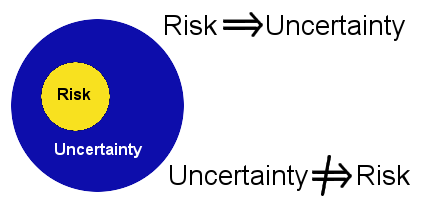
Risk and uncertainty are two sides of the same coin. Without uncertainty there is no risk.

No Uncertainty = No Risk

A risk is a contingent liability; a risk is a future event that is uncertain that has consequences. The key words are future and uncertain.

If 6 months remain and the deadline is in 2 months then there is no schedule risk because there is no uncertainty.

6 months late means that the earliest that the critical path items can finish is in 6 months. Just because the project has not hit the deadline and senior staff doesn't understand the project is late does not qualify the team to talk as if the outcome is uncertain.

It is disingenuous and cowardly to suggest to senior staff that a deadline is possible when you know that it is not.

When the team knows that they are late, they often talk about tasks as being risky simply because they hope that miracles can happen1.

Hope is not a strategy

In fact, Kahneman points out all of us are wired to bet (pray?) on unlikely outcomes when faced with certain losses, i.e. we double down when faced with a loss.  Team members know about the negative consequences of failure and make projects seem possible simply because they want to delay the pain. Even worse, as the situation gets more desperate people will take bigger and bigger risks.

Using the term schedule risk when a project is not feasible essentially robs the managers of making a course correction until the point where very little can be done.

At a minimum, money can be saved by winding the project down. Few people have the intestinal fortitude to speak out when they know that a project is late. Unfortunately, cowardice is very common.

If you take a paycheck then you have an obligation to your organization to tell them when a project is late.

So it makes no sense to talk about schedule risk when:
  • The project is late and you know it
  • The project is not late but you see schedule items slipping
In the latter case you are much better to talk about why things are slipping rather than using the term schedule risk.  By talking about the root cause of the slippage, especially early in a project, can lead to you either solving the problem or adjusting the project deadline.  Either way, you will have a greater chance of ending up with a feasible project.

Related Articles

References

Thursday, 16 January 2014

No Business Case == Project Failure

A business case comes between a bright idea for a software project and the creation of the software project. 

  • To - idea to have a project is born
  • Tcheck - formal or informal business case
  • Tstart - project is initiated
  • Tend - project finishes successfully or is abandoned
Not all ideas for software projects make sense.  In the yellow zone above, between idea and project being initiated, some due diligence on the project idea should occur.  This is where you do the business case, even if only informally on the back of a napkin.

The business case is where you pause and and estimate  whether the project is worth it, i.e. will this project leave you better off than if you did not do it. For those who want precise definitions the project should be NPV +ve.  In layman's terms, the project should leave the organization better off on it's bottom line or at least improve skill levels so that other projects are better off.

Projects that do not improve skills or the bottom line are a failure.

Out of 10 software projects (see Understanding your chances):
  • 3 are successful
  • 4 are challenged, i.e. over cost, over budget, or deliver much less functionality
  • 3 will fail, i.e. abandoned
This means that the base rate of success for any software project is only 3 out of 10. Yet executives routinely execute projects assuming that they can not fail, even though the project team may know that the project will be a failure from day 1.

Business cases give executives a chance to stop dubious projects before they start. (see Stupid is as Stupid Does) Understanding how formal the business case needs to be comes down to uncertainty. There are three key uncertainties with every project:
  • Requirements uncertainty
  • Technical uncertainty
  • Skills uncertainty
When there is a moderate amount of uncertainty in any of these three areas then a formal business case with cash flows and risks needs to be prepared.

Requirements Uncertainty

Requirements uncertainty is what leads to scope shift (scope creep).

The probability of a project failing is proportional to the number of unknown requirements when the project starts (see Shift Happens).

Requirements uncertainty is only low for two particular projects:
  1. re-engineering a project where the requirements do not change
  2. the next minor version of a software project. 
For all other software projects the requirements uncertainty is moderate and a formal business case should be prepared.

Projects new to you have high requirements uncertainty.

Technical Uncertainty

Technical uncertainty exists when it is not clear that all requirements can be implemented using the selected technologies at the level of performance required for the project. Technical uncertainty is only low when you have a strong understanding of the requirements and the implementation technology.  Uncertainty and risk are two different animals (see  Uncertainty Trumps Risk in Software Development)

When there is only a moderate understanding of the requirements or the implementation technology then you will encounter the following problems:
  • Requirements that get clarified late in the project that the implementation technology will not support
  • Requirements that can not be implemented once you improve your understanding of the implementation technology
Therefore technical uncertainty is high when you are doing a project for the first time and requirement uncertainty is high.  Technical uncertainty is high when you are using new technologies, i.e. shifting from Java to .NET or changing GUI technology.

Projects with new technologies have moderate to high uncertainty.

Skills Uncertainty

Skills uncertainty comes from using resources that are unfamiliar with the requirements or the implementation technology.  Skills uncertainty is a knowledge problem.

Skills uncertainty is only low when the resources understand the current requirements and implementation technology.

Resources unfamiliar with the requirements will often implement requirements in a suboptimal way when requirements are not well written.  This will involve rework; the worse the requirements are understood the more rework will be necessary.

Resources unfamiliar with the implementation technology will make mistakes choosing implementation methods due to lack of familiarity with the philosophies of the implementation libraries.  Often after a project is complete, resources will understood that different implementation tactics should have been used.

Formal or Informal Business Cases?

An informal business case is possible only if the requirements, technical, and skills uncertainty is low.  This only happens in a few situations:
  • Replacing a system where the requirements will be the same and the implementation technology is well understood by the team
  • The next minor version of a software system
Every other project requires a formal business case that will quantify what kind of uncertainty and what degree of uncertainty exists in the project.  At a minimum project managers facing moderate to high uncertainty should be motivated to push for a business case (see Stupid is as Stupid Does).

Here is a list of projects that tend to be accepted without any kind of real business case that quantifies the uncertainties:
  • Change of implementation technology
    • Moving to object-oriented technology if you don't use it
    • Moving from .NET to Java or vice versa
  • Software projects by non-software companies
  • Using generalists to implement technical solutions
  • Replacing systems with resources unfamiliar with the requirements
    • Often happens with outsourcing
Projects with moderate to high risks and no business case are doomed to fail.

Related articles

  • No Experience Necessary!
    • Surprisingly there is no correlation between years of experience and productivity.  This has been verified over 40 years.
  • Stop it! No, Really Stop It!
    • 5 worst practices that software organizations commonly practice that they need to stop right away

Wednesday, 18 September 2013

Are We There Yet?

We associate "are we there yet?" with kids asking incessantly if a long trip is almost over.  It is generally funny, however, it is less funny on a project that should be complete; it is even less funny if it is your project.

Projects follow distinct phases:
  1. Basic requirements are collected
  2. Project plan and end date are established
  3. Development starts
  4. Projects track to the project plan
Often, tasks start off well until they all level off at 90-95% complete and get stuck.  Management was satisfied with progress until the project stalls, they see frantic activity picking up and they start asking  "are we there yet?."

Like a family vacation, this trip is sometimes not even close to being finished.  You  expect that if 9,000 hours have been spent on a project estimated at 10,000 hours that you would be 90% done.

Surprisingly this is not the case for 7 projects out of 10 -- have you ever worked on a project where a 90% complete project plan meant the project was 90% done?

Project Plans can give the Illusion of Control


 Estimating project completion using the project plan is valid if there is a direct correlation between the project goal and the project plan. You often discover that the goal and the plan differ late in a project. Project plans and results differ because:
  • Requirements and tasks are missing
  • The project is incorrectly estimated
  • Work is performed on tasks that do not advance the project

Requirements and Tasks are Missing

Clearly missing requirements mean that more work will be necessary to get to the goal, but the time for this work is rarely added to the project deadline.

A relative of missing requirements is missing tasks, this occurs when the work breakdown structure is incomplete and more subtasks are necessary to complete a task than estimated.

In both cases, if there are 2,000 hours of missing requirements and tasks then a project initially forecasted for 10,000 hours should move the deadline to 11,000 hours.  Therefore if 9,000 hours are done then you are only 75% complete.

Project plans that show 90% complete when there are 20% of the tasks and requirements missing are really 75% complete.


Unfortunately, weak IT leadership, internal politics, and embarrassment over  poor estimates will not move the deadline and teams will have pressure put on them by overbearing senior executives to get to the original deadline even though that is not possible.

The Project is Incorrectly Estimated

There is much literature about how accurate estimates are possible and necessary to successful projects. Weak and uniformed IT leadership will cave in to senior management demands for project deadlines without formal estimates.

A typical CEO and VP Engineering interaction looks as follows:

CEO: We need feature X, how much will it cost and how long will it take to built?

VP Engineering: Well we need to define feature X properly, see how it will be implemented, determine if we have the necessary skill sets, and see what the impact to our other operations will be.  It will take time to do do this work.

CEO: We don't have time for formal estimates.  How hard can it be to add feature X?  By next Friday, I will need a ballpark estimate for time and cost.

VP Engineering: I'll see what I can come up with for next week.

Weak IT executives allow themselves to be bullied all the time by other executives that have no idea what is involved in IT projects.  The end result is an underspecified project that will be underestimated in time and cost (see Why Executive Declared Deadlines lead to Disaster)

The more inaccurate the requirements the more extra work there is to do to get to the target.  That is why short requirements processes lead to strongly shifting requirements and canceled projects (see Shift Happens).  In fact, the degree of requirements shift is equal to the chance of a project being canceled.

Work is Performed that Does Not Advance the Project

Even if a project is correctly specified, there are several activities that will be performed that will not advance the project:
  • Some requirements can not be implemented as specified and time will be spent researching and implementing work arounds
  • Some requirements will be ambiguously specified and be implemented incorrectly and need to be redone
  • Some requirements will be inconsistent and require time and analysis to establish consistent requirements
  • Infrastructure might need to be refactored when you discover that it will not support the code created later
Work executed on these activities will not advance your project and should not be counted in the total of completed hours.

So if 2,000 hours have been spent on activities that don't advance the project then if 9,000 hours have been done on a 10,000 hour project then you have really done 7,000 hours of the 10,000 hour project and you are only 70% done.

Project plans that show 90% complete when  20% has been spent on unproductive tasks are really 70% complete.

Unfortunately...

On projects you will have both missing tasks and unproductive activities.  So if 2,000 hours are unproductive and 2,000 hours are missing in a 10,000 hour project where 9,000 hours have been done then you have only done 7,000 hours on a 12,000 hour project you are only 58.3% done.

Project plans that show 90% complete when there are 20% missing requirements and 20% time spent unproductive tasks are really 53% complete.

Many of you have been in this situation before, you know that the project plan states that you are 90% done but you know that you are not even close to finishing the project.

 Not Changing the Deadline Leads to Worst Practices

Whether a project is off course because of missing activities or non-productive activities, not changing the project end date will lead to schedule pressure as the project advances and people slowly start to realize that you are not going to make it.


When it becomes clear that a project can't make it's original deadline many organizations will start common but deadly practices.  Excessive schedule pressure often leads to the following bad practices (see Stop It! No... Really stop it.):
  • Friction within the team
  • Friction amongst the managers
  • Inadequate communication with  stakeholders
  • Layoffs of key personnel

Solutions

There are only a few cures for the 'Are we there yet?' problem:
Intestinal Fortitude
  1. IT management with the intestinal fortitude to hold out for the creation of proper work breakdown structures and formal estimates
  2. Proper requirement processes that yield complete, consistent, and concise requirements
  3. Proper change management processes to alter the project deadline when missing tasks and non-productive activities are encountered
Failure to comply with these 3 principles means that you will continue to be subject to chaotic environments where 7 out of 10 projects fail (see Executives: Understanding your Chances of a Successful Project)

Monday, 27 August 2012

SR&ED and Eligibility

Most Canadian corporations know that the Canada Revenue Agency (CRA) gives out tax credits for Scientific Research and Experimental Development (SR&ED) work done by technical companies. This tax credit works out to 35% of the qualifying work and can be as high as 68% when overhead is factored in.

The Scientific Research part of the name makes some organizations assume that unless you are curing cancer, building rockets, or building a better mouse-trap that they must be engaged in rocket science to qualify for the tax credit -- nothing could be further from the truth.

For organizations involved in software development the key to claiming SR&ED is the Experimental Development part of the title.  Assuming that you have a project which has technical uncertainty then you will qualify for the tax credit.

So what qualifies as technical uncertainty?

Technical uncertainty occurs when you face a business problem that is well specified with skilled resources and it is unclear how to proceed.  Examples of technical uncertainty would be needing to:
  • double the number of transactions that you currently process
  • increase the efficiency of an compression algorithm
  • implement a security model that does not exist
Experimental development occurs when you hit a fork in the proverbial development road and it is unclear which direction to take.  

Sometimes you will know that there are multiple design alternatives and have to create prototypes for the different alternatives to determine the best solution. Sometimes you will choose a design alternative and have to abandon the choice and back-up and take another path.  In both cases there is a clear decision point where code needs to be tested for multiple alternatives.

There is actually an easy way to know if you are facing technical uncertainty and facilitate applying for SR&ED tax credits.  Most developers do not like reinventing the wheel; when faced with a requirement that is technically challenging most developers will Google it to see if there is a solution to the problem.  If your developers are regularly looking for technical solutions odds are that you have SR&ED eligible work.

Saving technical searches is the easiest way to figure out how much SR&ED eligible work you have.

If you search for a technical solution to a challenge and discover:
  1. There is a solution for the problem but it is proprietary
  2. There is an available solution that would cost too much to acquire
Then this work will be SR&ED eligible if it leads to experimental development.  The CRA does not require that you be the first to solve a technical problem, only that you search for public solutions before executing experimental development.

What isn't technical uncertainty?
There are a few issues which can masquerade as technical uncertainty and the CRA will not pay SR&ED credits for them:
  • Training
  • Poor requirements
If a COBOL programmer starts to develop software in Java then you will end up with quite a bit of experimental development as the programmer learns the new language.  However, the CRA will not pay for you to train developers.   Experimental development only occurs when developers who are familiar with the technologies that you are using (language, O/S, IDE, API) and then engage in experimental development.

To be explicit, the following would not qualify:
  • Language, Java developers needing to do C#
  • O/S, Developers familiar with Windows development developing on Android tablets
  • IDE, Developers familiar with Eclipse needing to use Sun's NetBeans
  • API, Developers familiar with one SQL database switching to the API of another SQL database
Only competent developers that hit technical uncertainty and face experimental development qualify for SR&ED.

The CRA will not pay for you to figure out what your requirements are. While you are working out your “business rules” you may look like you are resolving a technical challenge as you attempt multiple alternative paths. However, creating code to solve a business problem does not qualify for SR&ED.

Changing requirements because of a technical challenge does qualify


How do I know if I did Experimental Development?
The CRA gives you up to 18 months from a fiscal year end to claim your tax credits.  The problem is that if you wait this long none of your developers will remember what they did!

If your year end was March 31, 2011 then as of today (August 27, 2012) you can still claim your tax credits from 2011.  The problem is that your developers will have trouble remembering what they did from March 31, 2010 to March 31, 2011.

Frankly speaking, you would be lucky to have your developers recall what they did last month. When looking back over time, there are two kinds of development that easily qualify for SR&ED:
  1. Work abandoned for a technical reason
  2. Building multiple prototypes to solve a technical problem
If you were trying to accomplish something, let's say implementing a fine grain security model in a database and were forced to abandon the work for a technical reason then this will qualify for SR&ED.  If you abandoned the work because you no longer had the requirement, i.e. a business reason, then the work would not qualify for SR&ED.

If you ran up against a technical challenge and there were multiple design alternatives that lead to multiple prototypes being tried, then the work qualifies for SR&ED.  Even if the multiple design alternatives involved 3rd party software, as long as there were multiple prototypes and you had to write code then this work should qualify.

Document your technical challenges right away!

How do I Simplify the SR&ED Process?
The easiest way to simplify the SR&ED process is to track experimental development as it happens.  Once your developers solve a problem and use that solution for a few months then they will forget how difficult it was to solve the problem.


There are several techniques to help in the documentation of your SR&ED claim for the next year:
  1. Save your technical searches
  2. Tag your tasks in your project management system
  3. Train project managers to recognize SR&ED tasks
When the developers search for technical solutions and find none have them save the search (PDF, web page, etc).   If you work on several projects simultaneously then create a directory under each project where the developer will save the search.  In your project management system then have the developer document this information.
In your project management system (JIRA, Redmine, etc) have a tag for SR&ED so that tasks can be tagged for SR&ED.  As the developer or project manager discovers SR&ED tasks you can tag these tasks so that computing the hours for SR&ED next year will be easy.

Train your project managers to look for SR&ED tasks.  Inevitably, if a developer has a task that expands for a technical reason then he will have to notify the project manager about the event.  That will be the best time for the project manager to recognize SR&ED tasks and update the project management system.

Summary

All companies should make sure to have SR&ED trained people help you to make your claim.   The number of companies making SR&ED claims has increased strongly in the last few years and the CRA is more strict with regards to which projects qualify.

Do not be afraid to claim your SR&ED tax credits, if you have technical challenges that involve experimental development then they are yours.  Also, keep in mind that the earlier that you document your technical challenges the easier (and cheaper) it will be to make your SR&ED claim.

Tuesday, 14 August 2012

Uncertainty trumps Risk in Software Development

Successful software development involves understanding uncertainty, and uncertainty only comes from a few sources in a software project.  The uncertainties of a software project increase with the size of the project and the inexperience of the team with the domain and technologies.

The focus on this article is on uncertainty and not on risk.  In part 1 we discussed uncertainty and in part 2 we discussed risk, so it should be clear that:

All risks are uncertain, however, not all uncertainties are risks.

For example, scope creep is not a risk (see Shift Happens) because it is certain to happen in any non-trivial project.  Since risk is uncertain, a risk related to scope creep might be that the scope shifts so much that the project is canceled.  However, this is a useless risk to track because by the time it has triggered it is much too late for anything proactive to be done.

It is important to understand the uncertainties behind any software development and then to extract the relevant risks to monitor.  The key uncertainties of a software project are around:
  • requirements
  • technology
  • resources
  • estimating the project deadline

Uncertainty in Requirements
There are several methodologies for capturing requirements:
  • Business requirements document (BRD) or software requirement specification (SRS)
  • Contract-style requirement lists
  • Use cases
  • User stories
Regardless of the methodology used, your initial requirements will split up into several categories:


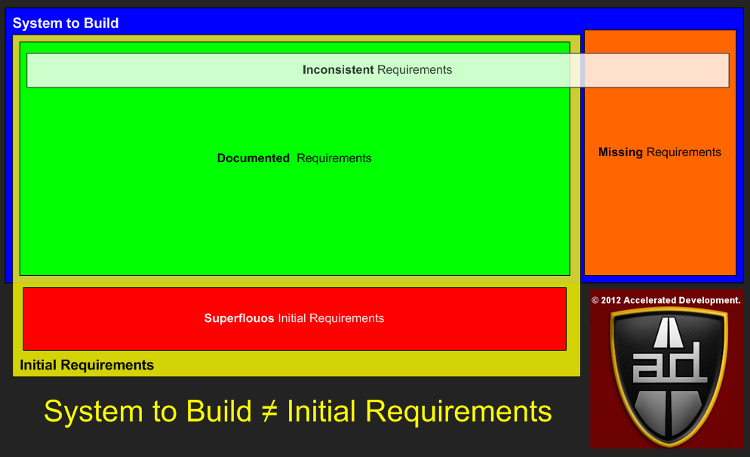
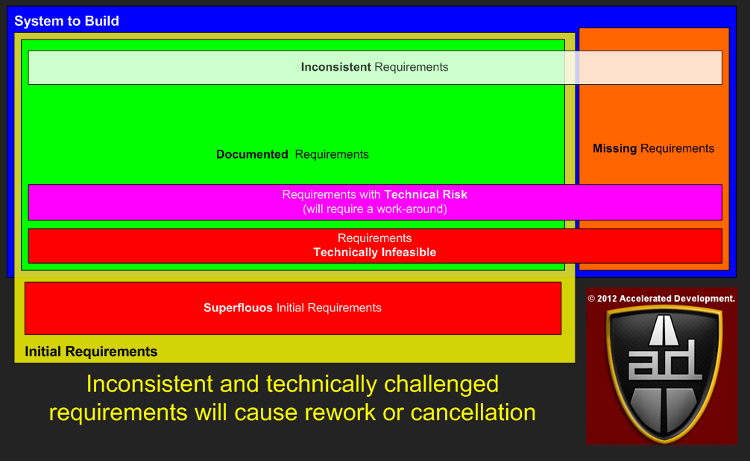
The blue area above represents what the final requirements will be once your project is completed, i.e. the System To Build.  The initial requirements that you capture are in the yellow area called Initial Requirements.

With a perfect requirements process the initial requirements area would be the same as the System To Build area.  When they don't overlap we get the following requirement categories:
  1. Superfluous requirements
  2. Missing requirements
Superfluous initial requirements tends to happen in very large projects or projects where the initial requirements process is incomplete.  Due to scope shift the Missing requirements category always has something in it (see Shift Happens).  If either of these two categories contains a requirement that affects your core architecture negatively then you will increase your chance of failure by at least one order of magnitude.


For example, a superfluous requirement that causes the architecture to be too flexible will put the developers through a high learning curve and lead to slow development.

If scalability is required of the architecture but it is missing during the initial architecture then you will discover that it is difficult and costly to add later.

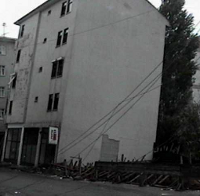
The physical equivalent would be the apartment building here on the right.  The foundation was insufficient to the needs of the building and it is slowly collapsing on one side.  Imagine the cost of trying to fix the foundation now that the building is complete.

I've been in start-ups that did not plan for sufficient scalability in the initial architecture; subsequently, the necessary scalability was only added with serious development effort and a large cost in hardware. Believe me, throwing expensive hardware at a software problem late in the life cycle is not fun or a practical solution :-(.

The overlapping box, Inconsistent Requirements, is to categorize known and missing requirements that turn out to be in conflict with other requirements.  This can happen when requirements are gathered from multiple user roles all of whom have a different view of what the system will deliver.

It is much easier and faster to test your requirements and discover inconsistencies before you start developing the code rather than discover the inconsistencies in the middle of development.  When inconsistencies are discovered by developers and QA personnel then your project will descend into fire-fighting (see Root cause of 'Fire-fighting' in Software Projects).

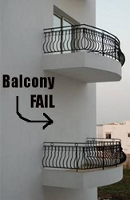
The physical equivalent here is to have a balcony specified to one set of contractors but forget to notify another set that you need a sliding door (see right).  When the construction people stumble on the inconsistency you may have already started planning for one alternative only to discover that rework is necessary to get to the other requirement.

Note, if you consistently develop software releases and projects with less than 90% of your requirements documented before coding starts then you get what you deserve (N.B. I did not say before the project starts :-) ).   One of the biggest reasons that Agile software development stalls or fails is that the requirements in the backlog are not properly documented; if you Google "poor agile backlogs" you will get > 20M hits.

Requirements Risks
Some risks associated with requirements are:
  • Risk of a missing requirement that affects the core architecture
  • Risk that inconsistent requirements cause the critical path to slip

Uncertainty in Technology
Technical uncertainty comes  from correctly using technology but failing to accomplish the goals as outlined by your requirements; lack of knowledge and/or skills will be handled in the next section (Uncertainty Concerning Resources).  Team resources that don't have experience with technology (poorly documented API, language, IDE, etc) does not constitute a technical risk it is a resource risk (i.e. lack of knowledge).

Technical uncertainty comes from only a few sources:
  • Defective APIs
  • Inability to develop algorithms
Unforeseen defects in APIs will impact one or more requirements and delay development.  If there is an alternative API with the same characteristics then there may be little or no delay in changing APIs, i.e. there are multiple choices for XML parsing in Java with the same API.

However, much of the time changing to another API will cause delays because the new API will be implemented differently than the defective one. There are no guarantees that the new API will be bug free.

Mature organizations use production APIs, but even then this does not protect you against defects.  The best known example has to be the Pentium bug from Intel discovered in 1994.  Although the bug did not seem to cause any real damage, any time you have an intermittent problem the source might always be a subtle defect in one of the APIs that you are using.

Organizations that use non-production (alpha or beta) APIs for development run an extremely high risk of finding a defect in an API.  This generally only happens in poorly funded start-ups where the technical team might have excessive decisional control in the choice of technologies.

The other source of technical uncertainty is the teams inability to develop algorithms to accomplish the software goals.  These algorithms relate to the limitations of system resources such as CPU, memory, batteries, or bandwidth concern, i.e.:
  • Performance
  • Memory management
  • Power management
  • Volume of data concerns
Every technical uncertainty is associated with one or more requirements.  The inability to produce an algorithm to satisfy a requirement may have a work-around with acceptable behavior or might be infeasible.

If the infeasible requirements prevents a core goal from being accomplished then the project will get canceled.  If affected requirements have technical work-arounds then the project will be delayed while the work-around is being developed.

Technical Risks

Some risks associated with technology are:
  • Risk that a defective API will cause us to look for another API
  • Risk that we will be unable to find a feasible solution for a core project requirement
Uncertainty Concerning Resources
When using the same team to produce the next version of a software product there is little to no resource uncertainty.  Resource uncertainty exists if one of the following are present:
  • Any team member is unfamiliar with the technology you are using
  • Any member of the team is unfamiliar with the subject domain
  • You need to develop new algorithms to handle a technical issue (see previous section)
  • Any team member is not committed to the project because they maintain another system
  • Turnover robs you of a key individual
Resource uncertainty revolves around knowledge and skills, commonly this includes: 1) language, 2) APIs, 3) interactive development environments (IDEs), and 4) methodology (Agile, RUP, Spiral, etc).  If your team is less knowledgeable than required then you will underestimate some if not all tasks in the project plan.

When team members are unfamiliar with the subject domain then any misunderstandings that they have will cause delays in the project.  In particular, if the domain is new and the requirements are not well documented then you will probably end up with the wrong architecture, even if you have skilled architects.

The degree to which you end up with a bad architecture and a canceled project depends on how unfamiliar you are with the subject domain and technologies being used.  In addition, the size of your project will magnify all resource uncertainties above.

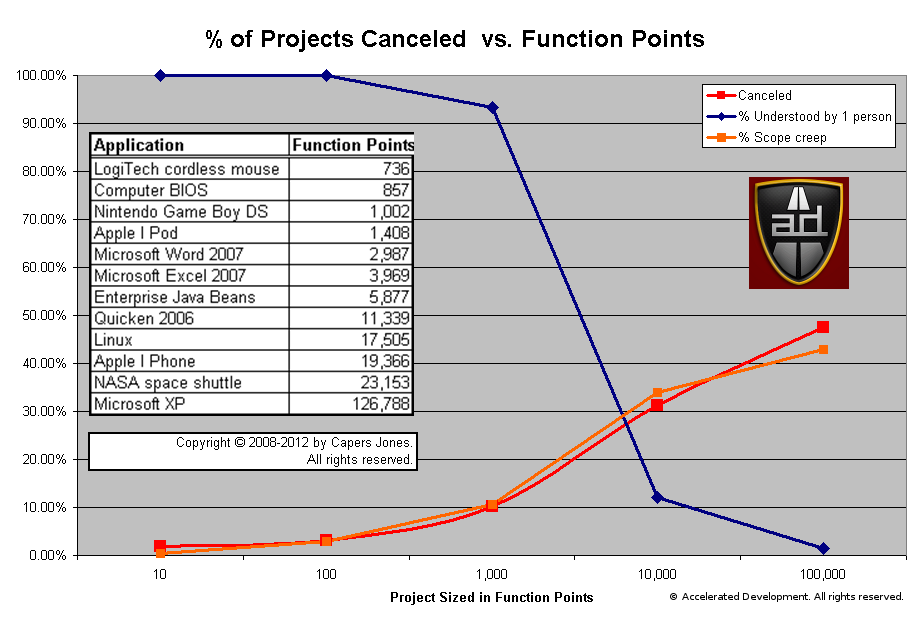
The majority of stand-alone applications are between 1,000 and 10,000 function points.  As you would expect, the amount of the system that any one person can understand drops significantly between 1,000 and 10,000 function points.  The number of canceled projects goes up as our understanding drops because all uncertainties increase and issues fall between the cracks.  N.B. The total % of the system understood by a single person drops precipitously between 1,000 and 10,000 function points.

When there are team members committed to maintaining legacy systems then their productivity will be uncertain.  Unless your legacy system behaves in a completely predictable fashion, those resources will be pulled away to solve problems on an unpredictable basis.  They will not be able to commit to the team and multi-tasking will lower their and the teams productivity (see Multi-tasking Leads to Lower Productivity).

Resource Risks
Some risks associated with resources are:
  • The team is unable to build an appropriate architecture foundation for the project
  • A key resource leaves the project before the core architecture is complete

Uncertainty in Estimation
When project end dates are estimated formally you will have 3 dates: 1) earliest finish, 2) expected finish, and 3) latest finish.  This makes sense because each task in the project plan can finish in a range of time, i.e. earliest finish to latest finish.  When a project only talks about a single date for the end date, it is almost always the earliest possible finish so there is a 99.9% chance that you will miss it.  Risk in estimation makes the most sense if:
  • Formal methods are used to estimate the project
  • Senior staff accepts the estimate
There are numerous cost estimating tools that can do a capable job.  Capers Jones lists those methods, but also comments about how many companies don't use formal estimates and those that do don't trust them:
Although cost estimating is difficult there are a number of commercial software cost estimating tools that do a capable job:  COCOMO II, KnowledgePlan, True Price, SEER, SLIM, SoftCost, CostXpert, and Software Risk Master are examples. 
However just because an accurate estimate can be produced using a commercial estimating tool that does not mean that clients or executives will accept it.  In fact from information presented during litigation, about half of the cases did not produce accurate estimates at all and did not use estimating tools.  Manual estimates tend towards optimism or predicting shorter schedules and lower costs than actually occur.    
Somewhat surprisingly, the other half of the case had accurate estimates, but they were rejected and replaced by forced estimates based on business needs rather than team abilities. 
Essentially, senior staff have a tendency to ignore formal estimates and declare the project end date.  When this happens the project is usually doomed to end in disaster (see Why Senior Management Declared Deadlines lead to Disaster).

So estimation is guaranteed to be uncertain.  Let's combine the requirements categories from before with the categories of technical uncertainty to see where our uncertainty is coming from.  Knowing the different categories of requirements uncertainty gives us strategies to minimize or eliminate that uncertainty.


Starting with the Initial Requirements, we can see that there are two categories of uncertainty that can addressed before a project even starts:
  1. Superfluous initial requirements
  2. Inconsistent requirements
Both of these requirements will waste time if they get into the development process where they will cause a great deal of confusion inside the team.  At best these requirements will cause the team to waste time, at worst these requirements will deceive the team into building the architecture incorrectly.  A quality assurance process on your initial requirements can ensure that both of these categories are empty.

The next categories of uncertainty that can be addressed before the project starts is:
  1. Requirements with Technical Risk
  2. Requirements Technically Infeasible
Technical uncertainty is usually relatively straight forward to find when a project starts. It will generally involve non-functional requirements such as scalability, availability, extendability, compatibility, portability, maintainability, reliability, etc, etc. Other technical uncertainties will be concerned with:
  1. algorithms to deal with limited resources, i.e. memory, CPU, battery power
  2. volume of data concerns, i.e. large files or network bandwidth
  3. strong security models
  4. improving compression algorithms
Any use cases that are called frequently and any reports tie up your major tables are sources of technical uncertainty.  If there will be significant technical uncertainty in your project then you are better off to split these technical uncertainties into a smaller project that the architects will handle before starting the main project.  This way if there are too many technically infeasible issues then at least you can cancel the project.

However, the greatest source of uncertainty comes from the Missing Requirements section.  The larger the number of missing requirements the greater the risk that the project gets canceled.  If we look at the graph we presented above:

You can see that the chance of a project being canceled is highly correlated with the % of scope creep. Companies that routinely start projects with a fraction of the requirements identified are virtually guaranteed to have a canceled project.

Beware of consulting firms that conduct audits of your software projects and  dramatically increase the scope of your projects.  The very action of increasing the scope will increase your chances of failure.  If their ability to increase scope results in them making more money then perhaps they don't have your best interests at heart.
In addition, even if you use formal methods for estimation, your project end date will not take into account the Missing Requirements.  If you have a significant number of missing requirements then your estimates will be way off.

Estimation Risks
The most talked about estimation risk is schedule risk.  Since most companies don't use formal methods, and those that do are often ignored, it makes very little sense to talk of schedule risk.

When people say "schedule risk", they are making a statement that the project will miss the deadline.  But given that improper estimation is used in most projects it is certain that the project will miss its deadline , the only useful question is "by how much?".

Schedule risk can only exist when formal methods are used and there is an earliest finish/latest finish range for the project.  Schedule risk then applies to any task that takes longer than its latest finish and compromises the critical path of the project.  The project manager needs to try to crash current and future tasks to see if he can get the project back on track.  If you don't use formal methods then this paragraph probably makes no sense :-)

Conclusion
The main sources of uncertainty in software development comes from:

  • requirements
  • technology
  • resources
  • estimates
Successful software projects look for areas of uncertainty and minimize them before the project starts. Some uncertainties can be qualified as risks and should be managed aggressively by the project manager during the project.

Uncertainty in requirements, technology, and resources will cause delays in your project.  If you are using formal methods than you need to pay attention to delays caused by uncertainties not accounted for in your model.  If you don't use formal methods then every time you hit a delay caused by an uncertainty, then that delay needs to be tacked on to the project end-date (of course, it won't be :-) ).

If your project does not have strong architectural requirements and is not too big (i.e. < 1,000 function points) then you should be able to use Agile software development to set-up a process that grapples with uncertainty in an incremental fashion.  Smaller projects with strong architectural requirements should set up a traditional project to settle the technical uncertainties before launching into Agile development.

Projects that use more traditional methodologies need to add a quality assurance process to their requirements to ensure a level of completeness and consistency before starting development.  One way of doing this is to put requirements gathering into its own project.  Once you capture the requirements, if you establish that you have strong architectural concerns, then you can create a project to build out the technical architecture of the project.  Finally you would do the project itself.  By breaking projects into 2 or 3 stages this gives you the ability to cancel the project before too much effort is sunk into a project with too much uncertainty.

Regardless of your project methodology; being aware of the completeness of your requirements as well as the technical uncertainty of your non-functional requirements will help you reduce the chance of project cancellation by at least one order of magnitude.

It is much more important to understand uncertainty that it is to understand risk in software development.

[Original article here, remember we have moved!]

Appendix: Traditional Software Risks
This list of software risks courtesy of Capers Jones.  Risks listed in descending order of importance.
  • Risk of missing toxic requirements that should be avoided
  • Risk of inadequate progress tracking
  • Risk of development tasks interfering with maintenance
  • Risk of maintenance tasks interfering with development
  • Risk that designs are not kept updated after release
  • Risk of unstable user requirements
  • Risk that requirements are not kept updated after release
  • Risk of clients forcing arbitrary schedules on team
  • Risk of omitting formal architecture for large systems
  • Risk of inadequate change control
  • Risk of executives forcing arbitrary schedules on team
  • Risk of not using a project office for large applications
  • Risk of missing requirements from legacy applications
  • Risk of slow application response times
  • Risk of inadequate maintenance tools and workbenches
  • Risk of application performance problems
  • Risk of poor support by open-source providers
  • Risk of reusing code without test cases or related materials
  • Risk of excessive feature "bloat"
  • Risk of inadequate development tools
  • Risk of poor help screens and poor user manuals
  • Risk of slow customer support
  • Risk of inadequate functionality