Showing posts with label Developers. Show all posts

Monday, 8 August 2016

Specifically, what is complexity?

People involved in software projects would say that software development is about understanding complexity.

What is complexity?

What can we do about it?

Complexity is easy to define at a high level, but people get vague when pressed for a precise definition.  Let's see if we can:

  • quantify the problem
  • define it
  • suggest how to address it

2 Brooks, Frederick Phillips. “The Mythic Man Month”, 1995. ISBN 0-201-00650-2

Tuesday, 4 November 2014

Pair Programming for Team Building

Extreme programming (XP) introduced most people to pair programming.

The theory was that the sooner that code was reviewed, the more effective the review -- so how much more effective can you be if you do that review right away?

Pair programming increases productivity by 3% and quality by 5%

The reason it isn't a better practice is that two people are being used to produce a single result and so it is not very efficient.  For more information about the marginal productivity see Capers Jones1.

However, as a team building tool, pair programming can be extremely effective used in specific situations where high productivity is maintained:
  • Training new team members in coding conventions
  • Sharing individual productivity techniques
  • Working through complex sections of code

New Team Members

The first issue is self explanatory, pair programming allows you to explain your coding conventions while working on actual projects.

It also gives you a fairly good glimpse into how that team member will work with the group.

The key here is that the new member should pair program with different people every day until they have worked with the entire team.  This will speed up the integration of new members and get everyone familiar with each other.

Sharing Productivity Practices

One of the key benefits of pair programming is that it is an ideal time to share productivity practices.

Surprisingly, it is not just the less experienced programmers that learn from the more experienced ones.  Often, more experienced programmers have picked up habits that they are not even aware of.

Working with newer programmers can expose you to information on IDEs and new productivity tools that you are not aware of.

As much as we do keep up, there is continually new stuff coming out and the newer programmers are aware of it.

In addition, there are sub-optimal habits that we all pick up and no longer notice because we do them all the time.

Working Through Complex Code

Once you have planned a complex section of code, it can be very helpful to build that section of code as a pair. For information on planning complex code see:
Planning is 1/2 the work, making sure that you implement that plan can often require two people to make sure that all loose ends (exceptions, boundary cases, etc) are taken care of.

In particular, these are the sections of code that you want two pairs of eyes on as you are much more likely to recognized a missed alternative or work through weird conditions.

Summary

Used appropriately, pair programming can be a great tool for integrating new members into a team, sharing productivity techniques, and reduce defects and improve quality of difficult sections of code.

References

  1. Jones, Capers and Bonsignour, Olivier.  The Economics of Software Quality.  Addison Wesley.  2011
  2. Jones, Capers. SCORING AND EVALUATING SOFTWARE METHODS, PRACTICES, AND RESULTS. 2008.

Thursday, 30 October 2014

Team Conflict is for Losers

It is a guarantee that you don't like someone on your development team and they have behaviors or habits that you might find objectionable:
But as irritating as you find your co-workers, odds are:

You do something that they find annoying...

Annoyances and poor communication can lead to conflicts that range from avoidance to all out war where people get drawn into taking sides.  But consider the cost of team conflict :

Issue Productivity Software Quality
Internal team conflict -10% -15%
Management conflict -14% -19%

The table above is only showing the average result of conflict, some of us have been in situations that get much, much worse.

Software development is not a popularity contest, you don't have to like everyone that you work with.  However, if you allow your feelings of annoyance escalate into conflict then there is a real cost to your project and ultimately in your stress levels.

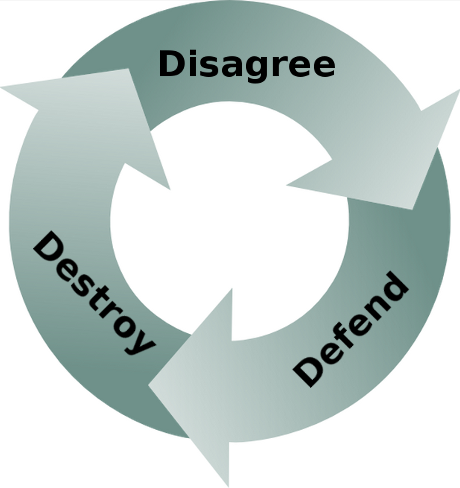
All conflicts start with disagreements.  The Communications Catalyst2 talks about the following cycle:
  • Disagree
  • Defend
  • Destroy
When you disagree with your coworkers then they don't feel listened to.  They will then defend their position by digging in their heels, then you will dig in your heels and the road to destruction starts. If there are any annoying habits present then the conflict will escalate quickly.

If things get out of hand then people start taking sides and productivity takes a major hit. In the worst conflicts this leads to loss of key personnel, which has been measured to be:

Loss of key personnel, productivity -16%, quality -22%

Losing key personnel who have comprehensive knowledge of business rules and organizational practices tied up in their heads often causes projects to face fault and come to a stand still. You may feel justified in starting a conflict or escalating one, however, as clever as you think you are, conflict hurts everyone -- yourself included.  Just remember:

It is virtually impossible to start/escalate a conflict that doesn't boomerang back and bite you in the @ss!

4 Ways to Avoid or Reduce Conflicts

Things to consider to avoid conflict:
  • Don't disagree first, signal that the other person has been heard
    • You will rarely agree with everything that someone else says, but start by agreeing with the part that you do agree with.1 This will at least signal that you have heard them and reduce their anxiety that you are not listening to them.
    • Even mechanically echoing everything that they just said is a way to signal that you heard what was said.
    • Once this is done, then talk about what you don't agree with.
  • Don't interrupt people.
    • When you are excited and thoughts are springing to mind then you may be tempted to do all the talking and stop listening; get this under control, take a breath, and let others talk.
    • People generally consider it rude when you interrupt and will assume arrogance on your part.  If you are not trying to be arrogant and someone tells you this then wake up -- you need to listen.
  • Don't be frustrated when people don't understand you
    • If you really know something that others don't then simply restating your point of view will not improve their understanding.
    • If your friend is lost in a new shopping mall then describing your location will not be helpful in helping him find you.  You need to find out where he is and walk him through the steps of getting to your location.
    • Be open to the idea that there might be something that you are not seeing.  With additional information you might revise your point of view.
  • Don't automatically assume that someone is insulting you
    • In virtually every case where someone feels insulted this is a knee-jerk reaction to a misunderstanding where no insult was intended.
    • Jumping to conclusions is not good under any circumstance, but is lethal in social interactions.
Managers should be on the lookout for the signs of conflict and clear them up while they are still small.  Most conflicts arise from simple misunderstandings. You will notice that most organizations will promote people based on their ability to work with others and resolve conflicts over competence.

Learning how to resolve conflicts is likely your ticket to an overdue promotion...

Other articles in the "Loser" series

Moo?

Want to see more sacred cows get tipped? Check out
Make no mistake, I am the biggest "Loser" of them all.  I believe that I have made every mistake in the book at least once :-)

References

  1. Carnegie, Dale.  How to Win Friends and Influence People. 1998.
  2. Connolly, Mickey and Rianoshek, Richard.  The Communication Catalyst, 2002.
  3. Jones, Capers and Bonsignour, Olivier.  The Economics of Software Quality.  Addison Wesley.  2011
  4. Kahneman, Daniel. Thinking Fast and Slow. 2011

Side Note

My best friend also works in the tech sector, and despite being friends for almost 25 years we have very few beliefs or habits in common.  There are subjects that we agree on, but then we don't agree on how they should be handled.

Even though we are very different people this has never stood in the way of us being able to do things together.  If you look around you will see radically different people that manage to cooperate and even thrive.

The key to all working relationships especially when the other person is very different from you is respect.

Tuesday, 12 August 2014

Schedule Risk is a Red Herring!!!

We often hear the term schedule risk, however, it is generally a Red Herring. Stating that the schedule might stretch is about as useful as saying that eating can cause you to gain weight.

You may be correct but it gives you no leverage to solve the problem

Schedules slip as a result of a problem, if you want to solve the problem then you must identify the root cause.  Any problem will result in a task taking longer than expected and potentially affecting the schedule.

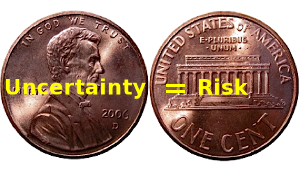
Risk and uncertainty are two sides of the same coin. Without uncertainty there is no risk.

No Uncertainty = No Risk

A risk is a contingent liability; a risk is a future event that is uncertain that has consequences. The key words are future and uncertain.

If 6 months remain and the deadline is in 2 months then there is no schedule risk because there is no uncertainty.

6 months late means that the earliest that the critical path items can finish is in 6 months. Just because the project has not hit the deadline and senior staff doesn't understand the project is late does not qualify the team to talk as if the outcome is uncertain.

It is disingenuous and cowardly to suggest to senior staff that a deadline is possible when you know that it is not.

When the team knows that they are late, they often talk about tasks as being risky simply because they hope that miracles can happen1.

Hope is not a strategy

In fact, Kahneman points out all of us are wired to bet (pray?) on unlikely outcomes when faced with certain losses, i.e. we double down when faced with a loss.  Team members know about the negative consequences of failure and make projects seem possible simply because they want to delay the pain. Even worse, as the situation gets more desperate people will take bigger and bigger risks.

Using the term schedule risk when a project is not feasible essentially robs the managers of making a course correction until the point where very little can be done.

At a minimum, money can be saved by winding the project down. Few people have the intestinal fortitude to speak out when they know that a project is late. Unfortunately, cowardice is very common.

If you take a paycheck then you have an obligation to your organization to tell them when a project is late.

So it makes no sense to talk about schedule risk when:
  • The project is late and you know it
  • The project is not late but you see schedule items slipping
In the latter case you are much better to talk about why things are slipping rather than using the term schedule risk.  By talking about the root cause of the slippage, especially early in a project, can lead to you either solving the problem or adjusting the project deadline.  Either way, you will have a greater chance of ending up with a feasible project.

Related Articles

References

Saturday, 12 July 2014

User Stories are Rarely Appropriate

All tools are useful when used appropriately, and User Stories are no different.

User stories are fantastic when used in small teams on small projects where the team is co-located and has easy access to customers.

User stories can quickly fall apart under any of the following situations:
  • the team or project is not small
  • the team is not in a single location
  • customers are hard to access
  • project end date must be relatively fixed
User stories were introduced as a core part of Extreme Programming (XP). Extreme Programming assumes you have small co-located teams; if you relax (or abandon) any of these constraints and you will probably end up with a process out of control.

XP, and hence user stories, works in high intensity environments where there are strong feedback loops inside the team and with customers:
  • Individuals and Interactions over Processes and Tools
  • Customer Collaboration over Contract Negotiation

User stories need intense intra-team / customer communication to succeed

User stories are a light-weight methodology that facilitates intense interactions between customers and developers and put the emphasis on the creation of code, not documentation. Their simplicity makes it easy for customers to help write them, but they must be complemented with timely interactions so that issues can be clarified.

Large teams dilute interactions between developers; infrequent communication leads to a lack of team synchronization. Most organizations break larger teams into smaller groups where communication is primarily via email or managers -- this kills communication and interaction.

Larger projects have non-trivial architectures. Building non-trivial architecture by only looking at the end user requirements is impossible. This is like having all the leaves of a tree and thinking you can quickly determine where the branches and the trunk should go.

User stories don't work with teams where intense interaction is not possible. Teams distributed over multiple locations or time zones do not allow intense interaction. You are delusional if you think regular conference calls constitute intense interaction; most stand-up calls done via conference degrade into design or defect sessions.

When emphasis is on the writing of code then it is critical that customers can be accessed in a timely fashion. If your customers are indirectly accessible through product managers or account representatives every few days then you will end up with tremendous latency.

Live weekly demos with customers are necessary to flush out misunderstandings quickly and keep you on the same page

User stories are virtually impossible to estimate. Often, we use user stories because there is a high degree of requirements uncertainty either because the requirements are unknown or it is difficult to get consistent requirements from customers.

Since user stories are difficult to estimate, especially since you don't know all the requirements, project end dates are impossible to predict with accuracy.

To summarize, intense interactions between customers and developers are critical for user stories to be effective because this does several things:
  • it keeps all the customers and developers on the same page
  • it flushes out misunderstandings as quickly as possible

All of the issues listed initially dilute the intensity of communication either between the team members or the developers and customers. Each issue that increases latency of communication will increase misunderstandings and increase the time it takes to find and remove defects.

So if you have any of the following:
  • Large or distributed teams
  • Project with non-trivial architecture
  • Difficult access to customers, i.e. high latency
  • High requirements uncertainty but you need a fixed project end-date
Then user stories are probably not your best choice of requirements methodology. At best you may be able to complement your user stories with storyboards, at worst you may need some light-weight form of use case.

Light-weight use case tutorial:

Other requirements articles:

Tuesday, 8 July 2014

Seriously. The Devil Made me do It!

Just as eternal as the cosmic struggle between good and evil is the challenge between our two natures. Religion aside, we have two natures, the part of us that:
  • thinks things through; makes good or ethical decisions a.k.a. our angelic nature
  • reacts immediately; makes quick but often wrong decisions a.k.a. our devil nature
Guess the powers that be left a bug in our brains so that it emphasizes fast decisions over good / ethical decisions.

Quite often we make sub-optimal or ethically ambiguous decisions under pressure

You decide...

Situation: Your manager comes to you and says that something urgent needs to be fixed right away. Turns out the steaming pile of @#$%$ that you inherited from Bob is malfunctioning again. 

Of course Bob created the mess and then conveniently left the company; in fact, the code is so bad that the work-arounds have work-arounds.

Bite the bullet, start re-factoring the program when things goes wrong.  It will take more time up front, but over time the program will become stable.  Start code inspections on the critical sections to proactively reduce defects (see Inspections are not Optional)

Find another fast workaround and defer the problem to the future.  Find a good reason why the junior member of the team should inherit this problem.

Situation: You've got a challenging section of code to write and not much time to write it.

Get away from the computer, think things through.  Get input from your peers, maybe they have seen this problem before. 

Then plan the pathways out and write the code once cleanly. Taking time to plan seems counter intuitive, but it will save time. (see Not Planning is for Losers)

Naw, just sit at the keyboard and bang it out already.  How difficult can it be?

Situation: The project is late and you know that your piece is behind schedule. However, you also know that several other pieces are late as well.

Admit that you are late and that the project can't finish by the deadline.  Give the project manager and senior managers a chance to make a course correction.

Say that you are on schedule but you are not sure that other people (be vague here) will have their pieces ready on time and it could cause you to become late.

This situation is also known as Schedule Chicken...

Situation: You have been asked to estimate how long a critical project will take. You are only been given a short time to come up with the estimate.

Tell the project manager that getting a proper estimate takes longer than a few hours. Without proper estimates the project is likely to be severely underestimated and this will come back to bite you and the project manager in the @$$.  (See Who needs Formal Measurement?)

Tell the project manager exactly the date that senior management wants the project to be finished by.  You know this is what they want to hear, why deal with the problem now? This will become the project manager's problem when the project is late.

The statistics show that we often don't listen to our better (angelic?) natures very often.

So when push comes to shove and you have to make a sub-optimal or less than ethical decision, just remember:
The devil made you do it!
Run into other common situations? email me

Monday, 9 June 2014

Don't be a Slave to Your Tools

Developers attach quickly to tools because they are concrete and have well defined behavior.  It is easier to learn a tool than to learn best practices or methodology. Tools only assist in solving problems, they can't solve the problem by themselves.

A developer who understands the problem can use tools to increase productivity and quality. Poor developers don't invest the time or effort to understand how to code properly and avoid defects.  They spend their time learning how to use tools without understanding the purpose of the tool or how to use it effectively.

To some degree, this is partially the fault of the tool vendors.  The tool vendors perceive an opportunity to make $$$$$ based on providing support for a common problems, such as:
  • defect trackers to help you manage defect tracking
  • version control systems to manage source code changes
  • tools to support Agile development (Version One, JIRA)
  • debuggers to help you find defects
There are many tools out there, but let's just go through this list and point out where developers and organizations get challenged.  Note, all statistics below are derived from over 15,000 projects over 40 years.1

Defect Trackers

Believe it or not, some organizations still don't have defect tracking software. I've run into a couple of these companies and you would not believe why. The effect of not having a defect tracking system is pretty severe, and there is evidence to prove this.

Inadequate defect tracking methods: productivity -15%, quality -21%

So we are pretty much all in agreement that we need to have defect tracking; we all know that the ability to manage more than a handful of defects is impossible without some kind of system

Automated defect tracking tools: productivity +18%, quality +26%

The problem is that developers disagree over what might be the best defect tracking system. The real problem is that almost every defect tracking system is poorly set-up, leading to poor results. Virtually every defect tracking system when configured properly will yield tremendous benefits. The most common pitfalls are:
  • Introducing irrelevant attributes into the defect lifecycle status, i.e. creation of statuses like deferred, won't fix, or functions as designed
  • Not being able to figure out if something is fixed or not
  • Not understanding who is responsible for addressing a defect
The tool vendors are happy to continue to provide new versions of defect trackers. However, using a defect tracker effectively has more to do with how the tool is used rather than which tool is selected.

One of the most fundamental issues that organizations wrestle with is what is a defect?  A defect only exists if the code does not behave according to specifications. But what if there are no specifications or the specifications are bad?  See It's not a bug, it's... for more information.

Smart organizations understand that the way in which the defect tracker is used will make the biggest difference.  Discover how to get more out of you defect tracking system in Bug Tracker Hell and How to Get Out.

Another common problem is that organizations try to manage enhancements and requirements in the defect tracking system.  After all whether it is a requirement or a defect it will lead to a code change, so why not put all the information into the defect tracker?  Learn why managing requirements and enhancements in the defect tracking system is foolish in Don't manage enhancements in the bug tracker.

Version Control Systems

Like defect tracking systems most developers have learned that version control is a necessary hygiene procedure.  If you don't have one then you are likely to catch a pretty serious disease (and at the least convenient time)

Inadequate change control: productivity -11%, quality -16%

Virtually all developers dislike version control systems and are quite vocal about what they can't do with their version control system.  If you are the unfortunate person who decided on the version control system,  just understand that there are hordes of developers out their cursing you behind your back.

Version control is simply chapter 1 of the story.  Understanding how to chunk code effectively, integrate with continuous build technology, and making sure that the defects in the defect tracker refers to the correct version are just as important as the choice of version control system.

Tools to support Agile

Sorry Version One and JIRA, the simple truth is that using an Agile tool does not make you agile, see this.

These tools are most effective when you actually understand Agile development.  One of my most effective Agile implementations only used Google docs in the implementation.

Enough said.

Debuggers

I have written extensively about why debuggers are not the best primary tools to track down defects. So I'll try a different approach here. :-)

One of the most enduring sets of ratios in software engineering has been 1:10:100.  That is, if the cost of tracking down a defect pre-test (i.e. before QA) is 1, then it will cost 10x if the defect is found by QA, and 100x if the defect is discovered in deployment by your customers. Most debuggers are invoked when the cost function is in the 10x or 100x part of the process.

It is not that I dislike debuggers -- I simply believe in using pre-test defect removal strategies because they cost less and lead to higher code quality. Pre-test defect removal strategies include:
  • Planning code, i.e. PSP
  • Test driven development, TDD
  • Design by Contract (DbC)
  • Code inspections
  • Pair programming for complex sections of code
You can find more information about this in:

Seldom Used Tools

Tools that can make a big difference but many developers don't use them:

Automated static analysis: productivity +21%, quality +31%

Automated sizing in function points: productivity +17%, quality +24%

Automated quality and risk prediction: productivity +16%, quality +23%

Automated test coverage analysis: productivity +15%, quality +21%

Automated deployment support: productivity +15%, quality +20%

Automated cyclomatic complexity computation: productivity +15%, quality +20%

Important Techniques with No Tools

There are a number of techniques available in software development that tool vendors have not found a way to monetize on. These techniques tend to be overlooked by most developers, even though they can make a huge difference in productivity and quality.

The Personal Software Process (PSP) and Team Software Process (TSP) were developed by Watts Humphrey, one of the pioneers of building quality software.

Personal software process: productivity +21%, quality +31%2

Team software process: productivity +21%, quality +31%3
Code inspections: productivity +21%, quality +31%4

Requirement inspections: productivity +18%, quality +27%4

Formal test plans: productivity +17%, quality +24%

Function point analysis (IFPUG): productivity +16%, quality +22%

The importance of inspections is covered in:

Conclusion

There is definitely a large set of developers that assume that using a tool makes them competent.

 The reality is that learning a tool without learning the principles that underlie the problem you are solving is like assuming you can beat the great Michael Jordan at basketball just because you have great running shoes.

Learning tools is not a substitute for learning how do do something competently.

Competent developers are continually learning about techniques that lead to higher productivity and quality, whether or not that technique is supported by a tool.

References

Monday, 5 May 2014

Agile tools do NOT make you Agile

Ask yourself the following questions:
  • Do great golf clubs make you a great golfer?
  • Does a formula one race make you an expert driver?
  • Do great development tools make you an expert developer?
Unless you are delusional, you know that the answer is NO to all these questions.  An expert's performance can be dramatically improved with the right tools, but a beginner will not perform better with a great tool.

No matter how Agile-enabled tools like Version One and JIRA become, using either tool will not make you Agile unless you understand what processes make agile development work.

I recently finished a contract at a large retailer where they use JIRA for an enterprise integration project. It was interesting to hear them use terms like sprint and back log; interesting because there was no regular sprint cycle, and the back log was only the tickets in the JIRA system.  JIRA supports the notion of user stories (epics and stories) yet neither of these were being used correctly.

The problem isn't  JIRA; the problem was that they believed that their process was Agile because JIRA supports agile development.

Being agile is about following the Agile Manifesto.

Agile software development is not informality. Agile development has fewer formal practices than traditional waterfall development and those formal practices need to be adhered to (see Agility is not informality).  Agile development is light weight because it avoids activities that are unnecessary to the production of working code, not because it avoids rigour and formality.

There are implementations of Scrum and XP that WORK and are agile because they implement sound development processes.  However, there are also plenty of organizations that are implementing Scrum and XP incorrectly (see Does Agile Hide Development Sins?)

Agile does not dictate that you have a fixed development CYCLE, but you can definitely succeed with one.  What is required is that you break a project into multiple cycles where you iterate on development.
Agile does not dictate HOW you keep your requirements (back log or stories) but you must have an effective requirements process.  If your requirements process is broken then you will never succeed with agile.

The Agile Manifesto puts the priority on things critical to development:
  • Individuals and interactions
  • Working product
  • Customer collaboration
  • Responding to change
However, agile does not reject things in the right hand column, unless they get in the way of the above factors:
  • Processes and tools
  • Comprehensive documentation
  • Contract negotiation
  • Following a plan
In particular, don't get get caught up in Processes and tools, i.e. Version One and JIRA.  These tools can help you if you understand the core principles of agile development.  If you don't, then these tools will leave you worse off than before.  Unfortunately, the popularity of agile development has every tool maker scrambling to change their product to support agile.

Tools will never extract or synthesize quality requirements and build quality code.  The only way to get to proper understanding of a project is to put priority on individuals and interactions; people and communication are the only way to solve problems -- tools are a secondary concern.

Individuals and interactions OVER processes and tools

Agile development does not dictate a fixed development cycle, but it does require that any cycle must finish with a working product.  The emphasis always has to be production code and that is why periodic demonstrations of working code are essential.

To accomplish this you need to understand your requirements, whether you have a back log or user stories.  There are many times when properly written use cases can be used.  Either way the requirements need to be correct and consistent, they need to be what the customer need, i.e. avoid hiding behind excessive documentation.

Working Product OVER excessive documentation

There is no way to get the requirements correct unless you have a strong working relationship with the customer.  The customer often does not get the initial requirements correct and often development does not understand them.  Focus on customer collaboration is the key to mutual understanding.

This is where most projects fall apart because both parties have a tendency to focus on contract negotiation. Contracts are necessary, but focusing on limiting liability and protecting yourself will not yield a relationship that leads to working software.

 Customer Collaboration OVER contract negotiation

You have to understand that following a plan does not make sense when either requirements or technical uncertainty causes you to change development direction due to the need to respond to change.

It means making reliable estimates up front of all requirements, not just caving into pressure from upper management (see Why Senior Management Declared Deadlines lead to Disaster).  This often means adding time to the projected end of the project when new requirements are discovered or technical challenges force work arounds.  Unfortunately, many projects do not re-adjust the projected end date under these circumstances, which leads to a death march project (see Death March Calculus)

Responding to change OVER following a plan

Agile development is about producing quality software by understanding the principles of the Agile Manifesto.  Agile development is not about deluding yourself simply because you are using a tool that supports agile development.  You can implement a very solid light weight agile solution using only spreadsheets.

Focus on being Agile first, then go find a tool

Other things that are compatible with agile development:

Wednesday, 16 April 2014

Productive Developers are Smart and Lazy

When I use the terms Smart, Lazy, and Developer; I mean the following:
  • Developer as in energetic and focused on building real-world code solutions
    • Not a dreamer who never gets around to writing anything practical
  • Smart as in able to think things through (i.e. not smart-ass)
  • Lazy as in lazy-loading, that is taking time to write code (i.e. not couch potato)
Good development is lazy development a.k.a. patient development; it happens when the developer spends the time necessary to think through all the pathways of the solution that he is developing BEFORE writing the code. That is lazy-writing of code, i.e. not writing code before the problem is understood.  The more due diligence a developer does to make sure that he is writing the correct code will reduce the amount of code that needs to be written.

This due diligence takes the form of:
  • Really understanding the requirements and getting product management (business analysts) to be clear on what are the ACTUAL requirements
    • They often are not given time to gather requirements
    • They often don't have access to the right subject matter experts
    • They sometimes have very poor abilities to synthesize consistent and complete requirements (see When BA means B∪ll$#!t Artist)
  • Really making sure that you understand how you are interfacing to other developers on your team and other teams, this involves:
    • collaboration in front of a white board
    • producing diagrams (UML and Visio)
It takes time to do this due diligence to make sure that you have consistent requirements and to make sure that you will have consistent interfaces with your peers.  However, developers are eager to start banging out code and spend hours at their desks banging out code.

In reality, less than 5% of that time is spend productively (see The Programmer Productivity Paradox).  If you see developers spending 100% of their time staring at their screens with no human interaction then you are looking at some of the worst developers.

It is a bad sign if developers are always coding

Productive developers are constantly checking their understanding of the requirements and making sure that they are staying in sync with their team's code.  Productive developers are in regular contact with the product managers/business analysts and can often be seen white boarding with their peers and architects. There are definitely developers who use their years of experience to become more productive, in fact among the best developers:
  • the ratio of initial coding time was about 20 to 1
  • the ratio of debugging times over 25 to 1
  • program execution speed about 10 to 1
  • program size 5 to 1
However, in the aggregate, developers do not become more productive over time (see No Experience Necessary!), i.e. over thousands of developers there is no correlation between years of experience and productivity.  In fact, we have measured productivity regularly 8 times over the last 50 years and years of experience do not correlate (in the aggregate) with productivity.

Why is lazy writing of code so important?

Code is often written before the requirements are understood or gathered.  In addition, quickly written code often fails to fit with everyone else's code; often, it is only during integration that this problem is discovered.   Good developers are patient and realize that there is a cost to writing code quickly.

Developers become psychologically attached to their code 

Bad developers are reluctant to change poorly written code.  Rather than rewrite suboptimal code, bad developers will simply add more code to make up for deficiencies. Even worse, they tend to blame everyone else for having bad code.  What you end up with is band-aid after band-aid that lead to a severely buggy and unstable system.

Don't get me wrong, good developers can find themselves in a situation where they have written sub-optimal code.  The difference is that a good developer will recognize a problematic section of code and:
  • Refactor the code if the code is largely doing the right thing
  • Rewrite the the code otherwise
When developers produce and maintain sub-optimal code, it becomes harder and harder to change this code as time goes on.  That is because their peers will need to write code that interfaces with the suboptimal code and build clumsy interfaces or work-arounds to make the code work. As the code base grows, too many later code units rely on the functionality of this initial code.  Of course, the later code can do little to increase the stability of the code and bugs multiply when simple changes are made; in short, development becomes slower and slower.

When in doubt, be lazy and write code late

Other relevant articles: