Showing posts with label QA. Show all posts

Friday, 8 July 2016

User stories or use cases?

Alistair Cockburn says "A user story is to a use case as a gazelle is to a gazebo".

If you are extremely familiar with both techniques then this makes sense.  If you are not familiar with both then suffice it to say that you can put a gazelle in a gazebo but not vice versa.

A user story is of the form As a <type of user>, I want <some goal> so that <some reason> (see here).  

A use case for withdraw money has many more components to it, and a skeleton of such a use case can be found here.  I develop this skeleton use case in a four part tutorial:
  • Part 1: Use case as a dialog
  • Part 2: What is an actor?
  • Part 3: Adding interface details
  • Part 4: Adding application context
The above user story is only a part of the entire use case.  For an ATM, a user story might be As a user, I want to withdraw money so that I can have physical cash.  This user story is only the summary of the withdraw money use case without the details.

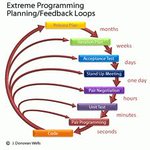
User stories come from the Extreme Programming methodology. The assumption was that there will be a high degree of interaction between the developers, and the end customer and that QA will largely be done through test driven development.  It is important to realize that Extreme Programming does not scale.

Once your development team gets large, i.e. you have 3+ agile teams and your code base gets large enough to warrant a formal testing environment, then you will outgrow user stories as your only method of capturing requirements.

You can still use user stories for new modules developed with an end customer to take advantage of the light weight and rapid nature of user stories, but at some point those user stories should transition to use cases.

Unfortunately, there are quite a few ways to build use cases and not all of them are effective.  Alistair Cockburn's method (found here) is an excellent way to capture use cases for more sophisticated systems.  There is no doubt that use cases are heavier weight than user stories, but consider this:
  • Use cases can more easily be turned into test cases by QA
  • With use cases you more easily prove that you have all the requirements
  • Use cases annotated with screens and reports can be used to collaborate with remote off site customers
  • Well written use cases can easily be broken up into a sprint back log
  • Use cases will work if you are not using Agile development methods
So don't forgo the speed and dynamic nature of user stories, just recognize that there are limits to user stories and that you will need to transition to use cases when your project team or application grows.

Monday, 9 June 2014

Don't be a Slave to Your Tools

Developers attach quickly to tools because they are concrete and have well defined behavior.  It is easier to learn a tool than to learn best practices or methodology. Tools only assist in solving problems, they can't solve the problem by themselves.

A developer who understands the problem can use tools to increase productivity and quality. Poor developers don't invest the time or effort to understand how to code properly and avoid defects.  They spend their time learning how to use tools without understanding the purpose of the tool or how to use it effectively.

To some degree, this is partially the fault of the tool vendors.  The tool vendors perceive an opportunity to make $$$$$ based on providing support for a common problems, such as:
  • defect trackers to help you manage defect tracking
  • version control systems to manage source code changes
  • tools to support Agile development (Version One, JIRA)
  • debuggers to help you find defects
There are many tools out there, but let's just go through this list and point out where developers and organizations get challenged.  Note, all statistics below are derived from over 15,000 projects over 40 years.1

Defect Trackers

Believe it or not, some organizations still don't have defect tracking software. I've run into a couple of these companies and you would not believe why. The effect of not having a defect tracking system is pretty severe, and there is evidence to prove this.

Inadequate defect tracking methods: productivity -15%, quality -21%

So we are pretty much all in agreement that we need to have defect tracking; we all know that the ability to manage more than a handful of defects is impossible without some kind of system

Automated defect tracking tools: productivity +18%, quality +26%

The problem is that developers disagree over what might be the best defect tracking system. The real problem is that almost every defect tracking system is poorly set-up, leading to poor results. Virtually every defect tracking system when configured properly will yield tremendous benefits. The most common pitfalls are:
  • Introducing irrelevant attributes into the defect lifecycle status, i.e. creation of statuses like deferred, won't fix, or functions as designed
  • Not being able to figure out if something is fixed or not
  • Not understanding who is responsible for addressing a defect
The tool vendors are happy to continue to provide new versions of defect trackers. However, using a defect tracker effectively has more to do with how the tool is used rather than which tool is selected.

One of the most fundamental issues that organizations wrestle with is what is a defect?  A defect only exists if the code does not behave according to specifications. But what if there are no specifications or the specifications are bad?  See It's not a bug, it's... for more information.

Smart organizations understand that the way in which the defect tracker is used will make the biggest difference.  Discover how to get more out of you defect tracking system in Bug Tracker Hell and How to Get Out.

Another common problem is that organizations try to manage enhancements and requirements in the defect tracking system.  After all whether it is a requirement or a defect it will lead to a code change, so why not put all the information into the defect tracker?  Learn why managing requirements and enhancements in the defect tracking system is foolish in Don't manage enhancements in the bug tracker.

Version Control Systems

Like defect tracking systems most developers have learned that version control is a necessary hygiene procedure.  If you don't have one then you are likely to catch a pretty serious disease (and at the least convenient time)

Inadequate change control: productivity -11%, quality -16%

Virtually all developers dislike version control systems and are quite vocal about what they can't do with their version control system.  If you are the unfortunate person who decided on the version control system,  just understand that there are hordes of developers out their cursing you behind your back.

Version control is simply chapter 1 of the story.  Understanding how to chunk code effectively, integrate with continuous build technology, and making sure that the defects in the defect tracker refers to the correct version are just as important as the choice of version control system.

Tools to support Agile

Sorry Version One and JIRA, the simple truth is that using an Agile tool does not make you agile, see this.

These tools are most effective when you actually understand Agile development.  One of my most effective Agile implementations only used Google docs in the implementation.

Enough said.

Debuggers

I have written extensively about why debuggers are not the best primary tools to track down defects. So I'll try a different approach here. :-)

One of the most enduring sets of ratios in software engineering has been 1:10:100.  That is, if the cost of tracking down a defect pre-test (i.e. before QA) is 1, then it will cost 10x if the defect is found by QA, and 100x if the defect is discovered in deployment by your customers. Most debuggers are invoked when the cost function is in the 10x or 100x part of the process.

It is not that I dislike debuggers -- I simply believe in using pre-test defect removal strategies because they cost less and lead to higher code quality. Pre-test defect removal strategies include:
  • Planning code, i.e. PSP
  • Test driven development, TDD
  • Design by Contract (DbC)
  • Code inspections
  • Pair programming for complex sections of code
You can find more information about this in:

Seldom Used Tools

Tools that can make a big difference but many developers don't use them:

Automated static analysis: productivity +21%, quality +31%

Automated sizing in function points: productivity +17%, quality +24%

Automated quality and risk prediction: productivity +16%, quality +23%

Automated test coverage analysis: productivity +15%, quality +21%

Automated deployment support: productivity +15%, quality +20%

Automated cyclomatic complexity computation: productivity +15%, quality +20%

Important Techniques with No Tools

There are a number of techniques available in software development that tool vendors have not found a way to monetize on. These techniques tend to be overlooked by most developers, even though they can make a huge difference in productivity and quality.

The Personal Software Process (PSP) and Team Software Process (TSP) were developed by Watts Humphrey, one of the pioneers of building quality software.

Personal software process: productivity +21%, quality +31%2

Team software process: productivity +21%, quality +31%3
Code inspections: productivity +21%, quality +31%4

Requirement inspections: productivity +18%, quality +27%4

Formal test plans: productivity +17%, quality +24%

Function point analysis (IFPUG): productivity +16%, quality +22%

The importance of inspections is covered in:

Conclusion

There is definitely a large set of developers that assume that using a tool makes them competent.

 The reality is that learning a tool without learning the principles that underlie the problem you are solving is like assuming you can beat the great Michael Jordan at basketball just because you have great running shoes.

Learning tools is not a substitute for learning how do do something competently.

Competent developers are continually learning about techniques that lead to higher productivity and quality, whether or not that technique is supported by a tool.

References

Tuesday, 19 November 2013

Who should set defect priority?

Surprisingly, defect priority should not be set by QA.  QA are generally the owners of the defect tracking system and control it, but this is one attribute that they should not control.  The defect tracker is a shared resource between QA, engineering, engineering management, and product mangement and is a coordinating mechanism for all these parties.

Commonly people mix up priority and severity, for example, there may be a severe defect that causes the software either not to install or to cease functioning.

It is common for new releases to have various installation problems when they first get to QA. This blocks QA, so they mark the defects with a high severity and high priority.  This issue has a high severity and needs to be addressed right away, but remember bug tracking systems are append only -- once this defect gets into the system, it will never get out.  This kind of issue should be escalated to the engineers and engineering management because it makes little sense to clog the defect tracking system with it.

Now there may be intermittent issues that cause the software to fail and you may assume that this defect would be high priority, but if it occurs very rarely and would cost too much to fix then this defect may be a low priority.  Once again the priority of an intermittent severe issue can not be determined by QA.

Similarly, there may be many cosmetic or minor defects where fixing them might make a huge difference in the user experience and reduce support calls.  Even though these defects are minor, they may be easy to fix and save you serious money.  Once again, this can not be decided by QA.

Therefore, QA should reserve the right to set the initial severity, and may have an internal field for QA priority, but the priority of a defect should be determined by a product manager (PM) who has a more complete understanding of the overall context of the product.  The priority of a defect is a business issue, not an engineering or QA issue.

Ideally, the product manger will set the priority of a defect during a defect triage session where representatives from engineering, engineering management, and QA are present. As you go through each new defect each person can present their logic for what the priority should be.  The PM should then set the priority defect and assign the release it should be fixed in (i.e. this release, minor release, major release, won't fix).  Ideally there are extra fields in the defect record for both QA and development to put their priority beliefs.

It is important that the main status field of a defect not include any of the following or your defect tracker will go to hell (i.e. this information should be in other fields):
  • Priority
  • Severity
  • Fix version
It is very hard to generate meaningful reports when these attributes creep into the defect status.  This has happened if you have a multi-page training manual for entering defects into the system.  Some of the statuses that make sense initially but turn the defect system into a nightmare are:
  • FAD (functions as designed)
  • WontFix
  • NextVersion
  • CantReproduce
Of course, if you don't have regular bug triage sessions with all the parties mentioned above then you are probably sand-bagged in fire-fighting.

Other related articles:

Tuesday, 8 January 2013

Testing Departments are for Losers

I understand that this is a very strong statement and I'm definitely not trying to insult anyone; so apologies in advance.  I'm trying to challenge the belief that testing is mandatory and that there should be one testing resource for every two developers.

Quality development is about quality assurance and zero defects not about having testing departments. Developers are the ones who inject defects into the code and therefore they are the best line of defense to remove them.  The developer has the best information on what needs to be tested in his code at the time that he writes it.  The longer it takes for testing or a customer to discover a code defect the longer the developer will spend in a debugger chasing down the problem.

One testing resource for every two developers is not a good solution

Quality Assurance (QA) is about making a positive statement about product quality.  QA is about positive assurance, which is stating,  “We are certain that there are few, if any, defects in this product.”  Airplanes are a product with quality assured, the manufacturers will stand by their quality and the statistics back them up.  Contrast this with this article or this article which wonders what would happen if Microsoft made airplanes -- would you fly in them?  This is not to say that software needs to have the same quality level as an airplane, only that whatever quality level you aspire to should be assured.

The reality is that most testing departments simply discover defects and forward them back to the engineering department to fix.  By the time the software product gets released we are basically saying, “We got rid of as many defects as we could find before management forced us to release this product, however, we really have no idea how many other defects are in the code”.  This is not assuring quality; at best you get negative assurance out of this.

Everyone understand that buggy software kills sales (and start-ups :-)), however, testing is often an after thought in many organizations.  When software products take longer than expected, the testing department is often expected to test and bless code in less time than allocated.

To compound problems, many testing departments don't even receive proper requirements against which to test the code and/or sufficient tools to work with. Large testing departments and/or large amounts of manual testing are not healthy or efficient.

Humphrey Watts was emphatic that calling defects “bugs” trivializes the issue and downplays the negative impact that defects cause on a development organization.

Calling defects "bugs" trivializes an important issue

Defects are not introduced into software by goblins and elves.  Defects are injected into the code by developers that:
  • don't understand the requirements or architecture
  • misunderstand how to use their peer's components
  • misunderstand 3rd party libraries
  • having a bad day because of home troubles or work environment
  • are careless because someone else will test their code
Defects are injected by the team

No one is more aware of how code can break down than the developer who writes it.   Any line of code that is written without concentration and planning becomes a potential defect.  It is impossible for testers to understand every pathway through the code and make sure that every possible combination of variables is properly taken care of.

There are many techniques that can increase code quality and dramatically reduce the amount of testing that is necessary:

Test Driven Development

Properly written tests require a developer not only to think about what a code section is supposed to do but also plan how the code will be structured.  If you know that there are  five pathways through the code then you will write five tests ahead of time.  A common problem is that you have coded n paths through the code when there are n+1 conditions.

TDD is white box testing and can reach every pathway that the developer codes.  TDD is proactive and can test pathways from end to end, it does not just have to be used for unit testing.  When TDD is hooked up to a continuous integration engine then defects are located and fixed before they make it to testing.

Database Driven Testing

Using actual test data to test existing routines during development is an excellent way to make sure that there are fewer production problems.  The test data needs to be a copy (or subset) of production data.

Database driven testing can also be hooked up to a continuous integration engine and prevent defects from getting to testing.

Design By Contract

The Eiffel programming language introduced design by contract (DbC).  DbC is orthogonal to TDD because its goal is to ensure that the contract defined by the preconditions and postconditions for each function call is not violated.  DbC can be used in virtually any language for with their is an Aspect Oriented Programming (AOP) solution.

During development, the minute a developer violates the expected contract of any function (his or a peers) then the developer will get feedback to fix the problem before it gets to testing.

Inspections

Since the 1970s we have statistical evidence that one of the best ways to eliminate defects from code is through inspections.  Inspections can be applied to the requirements, design, and code artifacts and projects that use inspections can eliminate 99% of the defects injected into the code.  Se Inspections are not Optional and Software Professionals do Inspections.

Each hour of inspections will save you 4 hours of testing

Pair Programming

Pair programming can be selectively used to prevent and eliminate defects from code.   When developers work in pairs they not only review code as quickly as possible but also learn productivity techniques from each other.  Pair programming should only be done on complex sections of code. Pair programming not only eliminates defects but allows developers to get enough feedback that they can prevent defects in the future.

Minimizing Cyclomatic Complexity

There is evidence that routines with high cyclomatic complexity will have more latent defects than other routines.   This makes sense because the number of code pathways goes up dramatically as cyclomatic complexity increases and increases the chance that the developer does not handle all of them.   In most cases, testing departments can not reproduce all of the pathways in routines of high cyclomatic complexity.

Use Dynamic and Static Code Checking

There are many code problems caused by a careless use of pointers and other powerful language constructs.  Many of these problems can be detected by having the development team use dynamic and static code checking problems.

Proper Code Planning Techniques

There are developers that try to write code at the keyboard without planning, which is neither efficient nor effective.  This is like having to do errands in 5 locations and driving to the locations randomly -- you might get your errands done, but odds are it won't be efficient.

Watts Humphrey talks directly to the idea of planning in the Personal Software Process.  In addition techniques like diagramming with UML or using decision tables can go a long way to thinking through code structure before it is implemented.

Conclusion


Developers are the ones who inject defects into the code and therefore they are the best line of defense to remove them.  The developer has the best information on what needs to be tested in his code at the time that he writes it.  The longer it takes for testing or a customer to discover a code defect the longer the developer will spend in a debugger chasing down the problem.

Developers need to be trained in preventing and eliminating defects.  Developers who learn to get the code correct the first time will reduce and eliminate effort in testing.

One goal of development should be to catch defects early; this is the only way to assure quality.  Hence quality assurance starts and finishes in the development department, not the testing department.

Friday, 14 September 2012

Bug Tracker Hell and How To Get Out!

Whether you call it a defect or bug or change request or issue or enhancement you need an application to record and track the life-cycle of these problems.  For brevity, let's call it the Bug Tracker.

Bug trackers are like a roach motel, once defects get in they don't check out!  Because they are append only, shouldn't we be careful and disciplined when we add "tickets" to the bug tracker?  We should, but in the chaos of a release (especially start-ups :-)) the bug tracker goes to hell.

Bug Tracker Hell happens when inconsistent usage of the tool leads to various problems such as duplicate bugs, inconsistent priorities and severities.  While 80% of defects  are straight forward to add to the Bug Tracker, it is the other 20% of the defects that cause real problems.

The most important attribute of a defect is its DefectLifecycleStatus; not surprisingly every Bug Tracker makes this the primary field for sorting.   This primary field is used to generate reports and to manage the defect removal process.  If we manage this field carefully we can generate reports that not only help the current version but also provide key feedback for post-mortem analysis.

Every Bug Tracker has at least the states Open, Fixed, and Closed, however, due to special cases we are tempted to create new statuses for problems that have nothing to do with the life cycle.  The creation of life cycle statuses that are not life cycle states is what caused inconsistent usage of the tool because then it becomes unclear how to enter a defect.

It is much easier to have consistent life cycle states than to have a 10 page manual on how to enter a defect.


(This color is used to indicate a defect attribute, and this color is used to indicate a constant.)

What Life Cycle States Do We Need?

Clearly we want to know how many Open defects need to be fixed for the  current release; after all, management is often breathing down our neck to get this information.

Ideally we would get the defects outstanding report by finding out how many defects are Open. Unfortunately, there are numerous open defects that will not be fixed in the current release (or ever :-( ) and so we seek ways to remove those defects from the defects outstanding.

Why complicate life?
In particular we are tempted to create states like Deferred,  WontFix, and FunctionsAsDesigned, to remove defects from the  defects outstanding. These states have the apparent effect of simplifying the defects outstanding report but will end up complicating other matters.

For example, Deferred is simply an open defect that is not getting fixed in the current release; WontFix is an open defect that  the business has decided not to fix; and FunctionsAsDesigned indicates that either the requirements were faulty or QA saw a phantom problem, but once this defect gets into the Bug Tracker you can't get it out. All three states above variants of the Open life cycle state and creating these life cycle states will create more problems than they solve. The focus of this article is on how to fix the defect life cycle, however, other common issues are addressed.

Life cycle states for Deferred, WontFix, or FunctionsAsDesigned is like a "Go directly to Bug Tracker Hell" card!


Each Defect Must Be Unambiguous

The ideal state of a Bug Tracker is to be able to look at any defect in the system and have a clear answer to each of the following questions.
  • Where is the defect in the life-cycle?
  • Has the problem been verified?
  • How consistently can the problem be reproduced or is it intermittent?
  • Which team role will resolve the issue? (team role, not person)
The initial way to get out of hell is to be consistent with the life cycle state.

Defect Life Cycle

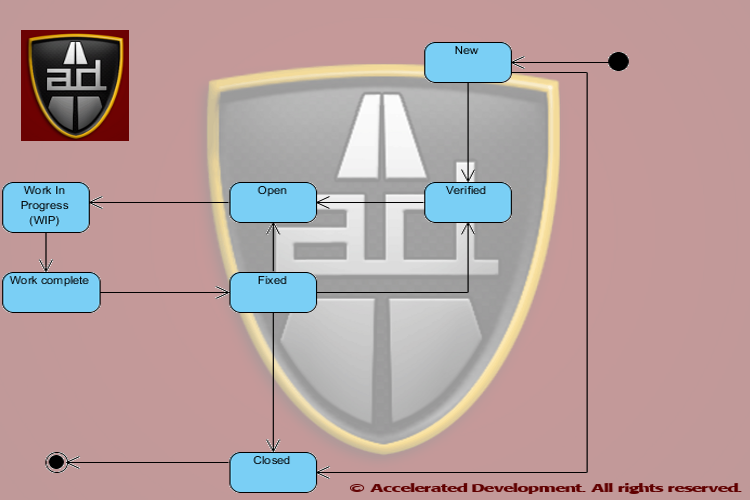
All defects go through the following life cycle (DefectLifecycleStatus) regardless of whether we track all of these states or not:
  • New
  • Verified
  • Open
  • Work in Process
  • Work complete
  • Fixed
  • Closed


Anyone should be able to enter a New defect, but just because someone thinks"I tawt I taw a defect!" in the system doesn't mean that the defect is real.  In poorly specified software systems QA will often perceive a defect where there is none, the famous functions as designed (FAD)  issue.

FAD = Requirements or test defect; if someone thought there was a defect then requirements are insufficient or the test plan is incorrect or someone did not follow a test plan.  You have a defect, it is just not in engineering.

Since there are duplicate and phantom issues that are entered into the Bug Tracker, we need to kick the tires on all New defects before assigning them to someone.  It is much faster and cheaper to verify defects than to simply throw them at the development team and assume that they can fix them.

Trust But Verify

New defects not entered by QA should be assigned to the QA role.  These defects should be verified by QA before the life cycle status is updated to Verified.  QA should also make sure that the steps to reproduce the defect are complete and accurate before moving the defect to the Verified life cycle status.  Ideally even defects entered by QA should be verified by someone else in QA to make sure that the defect is entered correctly.

By introducing a Verified  state you separate out potential work from actual work. If a bug is a phantom then QA can mark it as Closed  it before we assign it to someone and waste their time.  If a bug is a duplicate then it can be marked as such, linked to the other defect, and Closed.

The advantage of the Verified status is that the intermittent bugs get more attention to figure out how to reproduce them.  If QA discovers that a defect is intermittent then a separate field in the Bug Tracker, Reproducibility, should be populated with one of the following values:
  • Always (default)
  • Sometimes
  • Rare
  • Can't reproduce
Defects hard to reproduce stay in the New state until you can reproduce them.  If you can't reproduce them then you can mark the issue as Closed without impacting the development team.


Assign the Defect to a Role

QA has a tendency to assume that all defects are coding defects -- however, the analysis of 18,000+ projects does not confirm this.  In The Economics of Software Quality, Capers Jones and Olivier Bonsignour show that defects fall into different categories. Below we give the category, the frequency of the defect, and the business role that will address the defect.

Note, only the bolded rows below are assigned to developers.


Defect Role Category Frequency Role
Requirements defect 9.58% BA/Product Management
Architecture or design defect 14.58% Architect
Code defect 16.67% Developer
Testing defect 15.42% Quality Assurance
Documentation defect 6.25% Technical Writer
Database defect 22.92% DBA
Website defect 14.58% Operations/Webmaster

Defect Role Categories are important to accelerating  your overall development speed!

Even if all architecture, design, coding, and database defects are handled by the development group this only represents 54% of all defects.  So assigning any New defect to the development group without verification is likely to cause problems inside the team.

Note, 25% of all defects are caused by poor requirements and bad test cases, not bad code.  This means that the business analysts and QA folks are responsible for fixing them.

Given that 46% of all defects are not resolved by the development team there needs to be a triage before a bug is assigned to a role.  Lack of bug triages is the Root cause of 'Fire-Fighting' in Software Projects.

The Bug Tracker should be extended to record the DefectRole in addition to the assigned attribute.  Just this attribute will help to straighten out the Bug Tracker!

Non-development Defects

Most Bug Tracking systems have a category called enhancement.  Enhancements are simply defects in the requirements and should be recorded but not specified in the Bug Tracker; the defect should be Open with a DefectRole of ProductManagement.

Enhancements need to be assigned to product managers/BAs who should document and include a reference to that documentation in the defect.  The description for the defect is not the proper place to keep requirements documentation.  The life cycle of a product requirement is generally very different from a code defect because the requirement is likely to be deferred to a later release if you are late in your product cycle.
Business requirements may have to be confirmed with the end users and/or approved by the business.  As such, they generally take longer to become work items than code defects.

QA should not send enhancements to development without involvement of product management.

Note that  15.42% of the defects are a QA problem and are fixed in the test plans and test cases.

Bug Triage

The only way to correctly assign resources to fix a defect is to have a triage team meet regularly that can identify what the problem is.  A defect triage team needs to include a product manager, QA person, and developer.   The defect triage team should meet at least once a week during development and at least once a day during releases.  Defect triages save you time because only 54% of the defects can be fixed by the developers; correctly assigning defects avoids miscommunication.

Effective bug triage meetings are efficient when the only purpose of the meeting is to correctly assign defects.  Be aggressive and keep design discussions out of triages. 

Defects should be assigned to a role and not a specific person to allow maximum flexibility in getting the work done; they should only be assigned to a specific person when there is only one person who can resolve an issue.

Assigning unverified and intermittent defects to the wrong person will start your team playing the blame game.

As the defects are triaged, product management (not QA) should set the priority and severity as they represent the business.  With a multi-functional team these two values will be set consistently.  In addition the triage team should set the version that the defect will be fixed.  Some teams like to put the actual version number where a defect gets fixed(i.e. ExpectedFixVersion) I prefer to use the following:
  • Next bug fix
  • Next minor release
  • Next major  release
  • Won't fix
I like ExpectedFixVersion because it is conditional, it represents a desire.  Like it (or not) it is very hard to guess when every defect will be fixed.  The reality is that if the release date gets pulled in or the work turns out to be more involved than expected the fix version could be deferred (possibly indefinitely).  If you guess wrong then you will spend a considerable amount of time changing this field.

Getting the Defect Resolved

Once the defects are in the system each functional role can assign the work to its resources.  At that point the defect life cycle state is Work In Progress.

All Work complete means is that the individual working on the defect believes that it is resolved.  When the work is resolved the FixVersion should be set as the next version that will be released.  Note, if you use release numbers in the ExpectedFixVersion field then you should update that field if it is wrong :-)
Of course the defect may or may not be resolved, however, the status of Work complete acts a signal that someone else has work to do.

If a requirements defect is fixed then the issue should be moved to Fixed and assigned to the development manager that will give the work to his team.  Once the team has verified their understanding of the requirement the defect can move from Fixed to Closed.

Work complete means that the fixer  believes that problem is resolved, Fixed means that the team has acknowledged the fix!

For code defects the Work complete status is a signal to QA to retest the issue.  If QA establishes that the defect is fixed they should move the issue to Fixed.  If the issue is not fixed at all then the defect should move back to Open; if the defect is partially fixed then the defect should move to Verified so that it goes back through the bug triage process (i..e severity and priority may have changed).

Once a release is complete, all Fixed items can be moved to Closed.

Tracking Defects Caused by Fixing Defects

Virtually all Bug Trackers allow you to link one or more issues together.  However, it is extremely important to know why bugs are linked, in most cases you link bugs because they are duplicates.
Bugs can be linked together because fixing one defect may cause another.  On average this happens for every 14 defects fixed but in the worst organizations can happen every 4 defects fixed.  Keeping a field called ResultedFromDefect where you link the number of the other defect allows you to determine how new defects are the result of fixing other defects.

Knowing how many defects are created while fixing others is important to improving your development process.


Summary

Let's recap how the above mechanisms will help you get out of hell.
  1. By introducing the Verified step you make sure that bugs are vetted before anyone get pulled into a wild goose chase.
    1. This also will catch intermittent defects and give them a home while you figure out how often they are occurring and work out if there is a reliable way to produce them.
    2.  If you can't reproduce a defect then at least you can annotate it as Can't Reproduce, i.e. status stays as New and it doesn't clog the system
  2. By conducting triage meetings with product management, QA, and development you will end up with very consistent uses of priority and severity
  3. Bug triages will end up categorizing defects according to the role that will fix them which will reduce or eliminate:
    1. The blame game
    2. Defects being assigned to the wrong people
  4. By having the ExpectedFixVersion be conditional you won't have to run around fixing version numbers for defects that did not get fixed in a particular release.  It also gives you a convenient way to tag a defect as Won't Fix, the status should go back to Verified.
  5. By having the person who fixes a defect set the FixVersion then you will have an accurate picture of when defects are fixed
  6. When partially fixed defects go back to Verified the priority and severity can be updated properly during the release.

Benefits of the Process

By implementing the defect life cycle process above you will get the following benefits:
  • Phantom bugs and duplicates won't sandbag the team
  • Intermittent bugs will receive more attention to determine their reproducibility
    • Reproducible bugs are much easier to fix
  • Proper triages will direct defects to the appropriate role
  • You will discover how many defects you create by fixing other defects
By having an extended set of life cycle states you will be able to start reporting on the following:
  • % of defects introduced while fixing defects (value in ResultedFromDefect)
  • % of New bugs that are phantoms or duplicates, relates to QA efficiency
  • % of defects that are NOT development problems, relates to extended team efficiency (i.e. DefectRole <> Development)
  • % of requirements defects which relates to the efficiency of your product management (i.e. DefectRole = ProductManagement)
  • % of defects addressed but not confirmed (Work Completed)
  • % of defects fixed and confirmed (Fixed)
It may sound like too much work to change your existing process, but if you are already in Bug Tracker hell, what is your alternative?


Need help getting out of Bug Tracker hell?  Write to me at dmahal@AcceleratedDevelopment.ca


Appendix: Importance of Capturing Requirements Defects

The report on the % of requirements defects is particularly important because it represents the amount of scope shift (creep) in your project.   You can see this in the blog Shift Happens.  Also, if the rates of scope shift of 2% per month are strong indicators of impending swarms of bugs and project failure. Analysis shows that the probability of a project being canceled is highly correlated with the amount of scope shift.  Simply creating enhancements in the Bug Tracker hides this problem and does not help the team.