Showing posts with label Quality. Show all posts

Thursday, 8 December 2016

What is architecture?

On a regular basis we hear people talk of good and bad architecture, but what is architecture?

Before I describe software architecture, let's see if we can come to an agreement of what architecture is.  What are the components of architecture, and what value does architecture have.


Architecture provides the structural and connective framework required for a system of components to function.  Architecture is specific to a context, good architecture for a software system is different from that of a car or a building.

Architecture in general is not visible, it is present in the system but under other visible design components.  Before a discussion of software architecture, it would be best to describe architecture using physical objects.

Architectural Elements

Architecture involves two elements:
  1. Structure
  2. connective elements.  
Let's look at these two elements with respect to a building.

Structure for a building involves the foundation and the pieces that provide support to the entire building; it is the skeleton of the building.  If a building has an interesting shape it is because underneath the framework of rebar and concrete support the shape.

Connective elements can be structural, but they provide a way of linking different structural components for the purposes of transporting something.  Connective elements in a building transport air, water, and electricity.

The structural capability of the framework will dictate how high a building can go; generally speaking architecture determines size.  If the building has a framework of rebar and concrete that will support a 10 story structure, it will be difficult to add additional floors over 10 easily. Adding additional floors will require effort expended to reinforce the existing structural strength of the building


If a connective element is missing then adding it will be expensive.  For example, old brick buildings often didn't plan for plumbing or electricity.  If this element is added afterwards, then it will be much more expensive to put in.

If plumbing is added afterwards then you will see the plumbing running outside the walls. This can lead to problems if the building experiences sub-zero weather. 

It is similarly inconvenient to add electricity or air-conditioning to a building which has not had these connective elements designed into the building when it was built.

For comparison purposes, let's look at architecture in a couple of  contexts:
Object Structural component Connective elements
Building
  • Steel frame
  • Concrete
  • Bricks
  • Plumbing
  • Electrical system
  • HVAC system
  • Elevator
  • Emergency stairwell 
Car
  • Chasis
  • Tires
  • Drive train
  • Steering column
  • Gas conduits
  • Electrical system
  • HVAC system

Architecture and Visibility

In the two examples above, several things about architecture stand out:
  1. Structural components are generally hidden unless they are functional
  2. Connective elements are covered up in the final object
So for a building the structural element of the steel frame is invisible hidden under finishing elements. But there are cases where we see concrete or brick walls exposed.  Structural elements are generally not attractive and so we put in extra effort (i.e. cost) to hide the structural elements. Sometimes in the case of concrete or brick walls we will leave them exposed because the visual need to hide these elements are not there, i.e. a warehouse.

Connective elements are almost always hidden.  The sight of electrical wires, plumbing, or HVAC tubes is not aesthetically pleasing and we generally hide these elements.  If we are hiding a connective element, they are cheapest to put in when an object is being created the first time.

Cost of Fixing Hidden Connective Elements

Repairing a hidden connective element is expensive.  For example, fixing plumbing and electrical wires in a house are expensive depending on how hard it is to access the connective element.

Adding a connective element after the fact is much more expensive and much less attractive.  There are brick buildings that were built prior to indoor plumbing and electricity being available.  A good example of these buildings are the residences at Harvard or old brick warehouses that are now office space.  In the case of the Harvard residences the plumbing runs outside the residences and due to the winter weather in Boston, is subject to freezing.  Adding electricity to a brick warehouse involves running metal conduits inside the walls; since they are exposed, they are subject to water accidents.

Visible Structural Elements

In the case of a car the tires are a structural element, but they are exposed to view.  This is why effort goes into making the tires as attractive as possible, i.e. white wall tires, decorative hub caps, etc.

Purpose of Architecture

Once the architecture is set it determines two things:
  1. The size of an object
  2. The functional capabilities of the object
As previously mentioned, the structural architecture of a building will dictate its maximum size and the connective elements will outline its capabilities.  Connective elements are always about functional capabilities.

The purpose of structural architecture is to partition an object into sub-components that are independent and can be designed separately.  For example, in a building, the structural architecture allows you to subsequently design each of the apartments separately without worrying about how the design of one room affects another.

For a car, the main structural element of the chassis allows you to design the following sub-components separately:
  • engine
  • doors
  • lights
  • seats
By allowing sub-components to be designed separately we subdivide a problem (i.e. divide-and-conquer), which reduces the complexity of overall design.  It allows separate teams to work on the sub-components.  Good architecture facilitates strong polymorphism in the sub-components.

In an apartment, each apartment can be designed differently and by different people.  In a car, the engine can be designed by one group of people different from that designing the doors, lights, or other part of the car.

The connective components in each object either: 1) provides a shared service that is accessible to multiple components, or 2) provides a coordination of sub-components to achieve a higher level function.

Electricity, plumbing, and HVAC are all examples of shared services that are available to an entire building.  The usage of electricity in one room does not dictate the usage of electricity in another room, however, aggregate usage of electricity is sized by the architecture.

Elevators for a building and steering columns and the gas system of a car are examples of components that are coordinated across multiple levels of the object.  They provide an overall functionality when all of the sub-components coordinated are functioning.

In general, if one of the sub-components is not functioning then the entire set of coordinating objects will fail to function.  For a car, if any component in the diagram fails then the engine itself will fail.

Summary

In any object composed of multiple sub-objects there is architecture.  Architecture provides two different but related functions that is:
  1. Structural components
  2. Connective elements
The architecture of an object dictates how large it can be and determines how separately each sub-component can be designed.

This article focused on physical objects, the next article will focus on software architecture.

Friday, 7 October 2016

Why Outsourcing Fails


Every year, we see corporations outsource operations only to pull back back some, if not all, of the operations. When this happens, the cost of pulling back operations or splitting things over multiple countries can leave you with significant operational issues and similar or worse costs.

Successful corporations understand the need to control costs in operations. The "spare no expense" philosophy of John Hammond in Jurassic Park is a one way ticket to disaster.

But, a focus on cost reduction is what leads corporations to face-fault when they outsource.

Corporations are seduced by the idea of potentially cutting costs dramatically; why pay expensive resources to do repetitive things when overseas people can do the same work for pennies?

The cardinal rule when outsourcing is:

Only operations that you completely understand and control can be outsourced 

To understand operations is to understand the costs of exceptions as well as how they are processed and escalated. Local resources deal efficiently with exceptions because they have informal relationships in the organization and use them to get things done efficiently; those relationships are not available to outsourced resources.

When operations gets outsourced, not only do foreign employees not understand how to deal with exceptions but also:

  • They are often in another time zone 
  • They don't have full access to local resources 
  • They don't know who to contact inside the corporation 
  • They don't understand local business rules 
  • The network configuration can make it impossible to communicate properly 

Understanding an operational function means that you capture all details, including exceptions, in your information systems. Often, legacy information systems capture exception information as unstructured fields (i.e. memo fields) and off shore resources will not understand this.

99% of your operations might be straight forward, but the 1% of exceptions can at best lead to longer implementation times.  Best case scenario is that you will look bad to your customers and at worst, it will kill your bottom line.

If your information systems contain exception information in a structured way then at least you can eventually train foreign resources to resolve them. But unless exception information is captured so you can control it (i.e. not in general text fields) then it is the same thing as not having it.

When outsourced resources are under strict performance guidelines, they will do anything to clear their work queues. This often involves kicking back work they perceive as an exception as improperly specified; they will claim 'garbage in, garbage out'.

This will result in miscommunications and longer lead times to implement your services. Not only will delivery times, and errors go up, and your customers will get mad.

By the time you have fired the local employees, all the knowledge of the function has left the building and you are left with a broken system.

Key questions to get answers to:

  • What does each exception in operations cost? 
  • How often do they happen? 
  • Can the information systems record exceptions in a way that you can track and control them? 
  • Are the mechanisms that local resources use to resolve exceptions be used by outsourced resources? 

If you don't have a clear answer to each of these questions then outsourcing is likely to be a disaster. When you have a clear answer to the 3 questions and understand how you will address each exception then you will have much more success outsourcing.

Friday, 17 June 2016

Ready, Fire, Aim: How most gather requirements

Connecting with your customers and delivering value depends on understanding your customer's requirements and selling the correct product or solution that solves your customer's problems.

Commonly, the requirements gathering process is done hastily or not at all in the rush to get the sale. After all, the faster you can make the sales, the faster the money is in the bank -- correct?

The more that product customization is required, the more it is important understand the customer's actual problem.  Long lead times to build and implement a solution means will not only lead to difficult implementations but also to a more disappointed customer and a loss of future revenue.

If you build software, which has long lead times, it is even more important to make sure that what you are building will satisfy the customer's requirements as changing the final software solution will be nearly impossible and very costly.

Why do we continually misunderstand and sell the wrong solutions and building the wrong software?

Human Nature

Time pressures to make a sale put us under pressure and this stress leads to making quick decisions about whether a product or solution can be sold to a customer.  We listen to the customer but interpret everything he says according to the products and solutions that we have.

Often the customer will use words that seem to match exactly the products we have.  But then after the sale once we have to implement we often find that either we deliver a poor solution to the customer or a solution is infeasible and we must refund the customers money.

However, behind every word that the customer is using there is an implied usage, and understanding that implied usage is where we fail to gather requirements. For example, suppose the customer says I need a car.

Suppose that you sell used cars:
  • the customer asked for a car
  • you sell cars
Ergo problem solved!
  • What if the customer needs an SUV but you don't have any?
  • What if the customer really needs a truck?
  • What if the customer needs a car with many modifications?
  • What if the car the customer needs has never been built?
We hear the word car and we think that we know what the customer means.  The order-taker sales person will spring into action and sell what he thinks the customer needs. Behind the word car is an implied usage and unless you can ferret out the meaning that the customer has in mind, you are unlikely to sell the correct solution.

If you don't understand how the customer will to use your solution then you don't understand the problem.

Comedy of Errors

For products that require customization, the sale will get transferred to professional services that will dig deeper into the customer's requirements.  At this point you discover that the needs of the customer cannot be met.  This leads to sales people putting pressure on professional services and product management to find a solution, after all, losing the sale is not an option.

Sometimes heroic actions by the product management, professional services, and software development teams lead to a successful implementation, but usually not until there has been severe pain at the customer and midnight oil burned in your company.  You can eventually be successful but that customer will never buy from you again.

Consequences

As WIlliam Ralph Inge said, There are no rewards or punishments -- only consequences. The consequence of selling the wrong solution to a customer is:
  • Whether you lose the sale or not, the customer loses faith in you
  • The sales person is perceived as incompetent in the rest of the organization especially by professional services and software devleopment
  • Your cost of sales and implementation is much higher than expected
  • Your reputation is damaged

Conclusion

Selling the correct solution to the customer requires that you understand the customer's problem before you sell the solution.

When customization is required, good sales people engage resources that can capture the customer's requirements accurately and assess that you can deliver a solution to the customer.

Slowing down to understand the customer requirements and how you will solve his problems is the key.  By understanding the customer's requirements and producing the correct solutions you become a trusted adviser to the customer.

See also

  • Shift Happens, effect of scope shift in a software development project.

Wednesday, 17 December 2014

Not using UML on Projects is Fatal

The Unified Modeling Language (UML) was adopted as a standard by the OMG in 1997, almost 20 years ago.  But despite its longevity, I'm continually surprised at few organizations actually use it.

Code is the ultimate model for software, but it is like the trees of a forest.  You can see a couple, but only few people can see the entire forest by just looking at the code.  For the rest of us, diagrams are the way to see the forest, and UML is the standard for diagrams.

They say, "A picture is worth a thousand words", and this is true for code; even on a large monitor you can only see so many lines of code.  Every other engineering discipline has diagrams for complex systems, e.g. design diagrams for airplanes, blueprints for buildings.  In fact, the diagrams need to be created and approved  BEFORE the airplane or building is created.


Contrast that with software where UML diagrams are rarely produced, or if they are produced, they are produced as an after thought.  The irony is that the people pushing to build the architecture quickly say that there is no time to make diagrams, but they are the first people to complain when the architecture sucks.  UML is key to planning (see Not planning is for losers)

I think this happens because developers, like all people, are focused on what they can see and touch right now.  It is easier to try to code a GUI interaction or tackle database update problems than it is to work at an abstract level through the interactions that are taking place from GUI to database

Yet this is where all the architecture is.  Good architecture makes all the difference in medium and large systems.  Architecture is the glue that holds the software components in place and defines communication through the structure.  If you don't plan the layers and modules of the system then you will continually be making compromises later on.

In particular, medium to large projects (>10,000 function points) are at a very high risk of failure if you don't consider the architectural issues.  Considering only 3 out of 10 software projects are successful only a fool would skip planning the architecture (see Failed? You get what you deserve!)

Good diagrams, in particular UML, allow you to abstract away all the low level details of an implementation and let you focus on planning the architecture.  This higher level planning leads to better architecture and therefore better extensibility and maintainability of software.

If you are a good coder then you will make a quantum leap in your ability to tackle large problems by being able to work through abstractions at a higher level.  How often do we find ourselves unable to implement simple features simply because the architecture doesn't support it?

Well the architecture doesn't support it because we spend very little time developing the blueprint for the architecture of the system.

UML diagrams need to be produced at two levels:
  • the analysis or 'what' level
  • the design or 'how' level
Analysis UML diagrams (class, sequence, collaboration) should be produced early in the project and support all the requirements.  Ideally you use a requirements methodology that allows you to trace easily from the requirements onto the diagrams.

Analysis diagrams do not have implementation classes on them, i.e. no vendor specific classes.  The goal is to identify how the high level concepts (user, warehouse, product, etc) relate to each other.

These analysis level UML diagrams will help you to identify gaps in the requirements before moving to design.  This way you can send your BAs and product managers back to collect missing requirements when you identify missing elements before you get too far down the road.

Once the analysis diagrams validate that the requirements are relatively complete and consistent, then you can create design diagrams with the implementation classes.  In general the analysis diagrams are one to many to the design diagrams.

Since you have validated the architecture at the analysis level, you can now do the design level without worrying about compromising the architectural integrity.  Once the design level is complete you can code without compromising the design level.

When well done the analysis UML, design UML, and code are all in sync.  Good software is properly planned and executed from the top down.  It is mentally tougher to create software this way, but the alternative is continuous patches and never ending bug-fix cycles.

So remember the following example from Covey's The 7 Principles of Highly Effective People:
You enter a clearing where a man is furiously sawing at a large log, but he is not making any progress.  You notice that the saw is dull and is unable to cut the wood, so you say, "Hey, if you sharpen the saw then you will saw the log faster".  To which the man replies, "I don't have time, I'm too busy sawing the log".

Don't be the guy sawing 
with a dull saw

UML is the tool to sharpen the saw, it does take time to learn and apply, but you will save yourself much more time and be much more successful.

Bibliography

Tuesday, 4 November 2014

Pair Programming for Team Building

Extreme programming (XP) introduced most people to pair programming.

The theory was that the sooner that code was reviewed, the more effective the review -- so how much more effective can you be if you do that review right away?

Pair programming increases productivity by 3% and quality by 5%

The reason it isn't a better practice is that two people are being used to produce a single result and so it is not very efficient.  For more information about the marginal productivity see Capers Jones1.

However, as a team building tool, pair programming can be extremely effective used in specific situations where high productivity is maintained:
  • Training new team members in coding conventions
  • Sharing individual productivity techniques
  • Working through complex sections of code

New Team Members

The first issue is self explanatory, pair programming allows you to explain your coding conventions while working on actual projects.

It also gives you a fairly good glimpse into how that team member will work with the group.

The key here is that the new member should pair program with different people every day until they have worked with the entire team.  This will speed up the integration of new members and get everyone familiar with each other.

Sharing Productivity Practices

One of the key benefits of pair programming is that it is an ideal time to share productivity practices.

Surprisingly, it is not just the less experienced programmers that learn from the more experienced ones.  Often, more experienced programmers have picked up habits that they are not even aware of.

Working with newer programmers can expose you to information on IDEs and new productivity tools that you are not aware of.

As much as we do keep up, there is continually new stuff coming out and the newer programmers are aware of it.

In addition, there are sub-optimal habits that we all pick up and no longer notice because we do them all the time.

Working Through Complex Code

Once you have planned a complex section of code, it can be very helpful to build that section of code as a pair. For information on planning complex code see:
Planning is 1/2 the work, making sure that you implement that plan can often require two people to make sure that all loose ends (exceptions, boundary cases, etc) are taken care of.

In particular, these are the sections of code that you want two pairs of eyes on as you are much more likely to recognized a missed alternative or work through weird conditions.

Summary

Used appropriately, pair programming can be a great tool for integrating new members into a team, sharing productivity techniques, and reduce defects and improve quality of difficult sections of code.

References

  1. Jones, Capers and Bonsignour, Olivier.  The Economics of Software Quality.  Addison Wesley.  2011
  2. Jones, Capers. SCORING AND EVALUATING SOFTWARE METHODS, PRACTICES, AND RESULTS. 2008.

Thursday, 30 October 2014

Team Conflict is for Losers

It is a guarantee that you don't like someone on your development team and they have behaviors or habits that you might find objectionable:
But as irritating as you find your co-workers, odds are:

You do something that they find annoying...

Annoyances and poor communication can lead to conflicts that range from avoidance to all out war where people get drawn into taking sides.  But consider the cost of team conflict :

Issue Productivity Software Quality
Internal team conflict -10% -15%
Management conflict -14% -19%

The table above is only showing the average result of conflict, some of us have been in situations that get much, much worse.

Software development is not a popularity contest, you don't have to like everyone that you work with.  However, if you allow your feelings of annoyance escalate into conflict then there is a real cost to your project and ultimately in your stress levels.

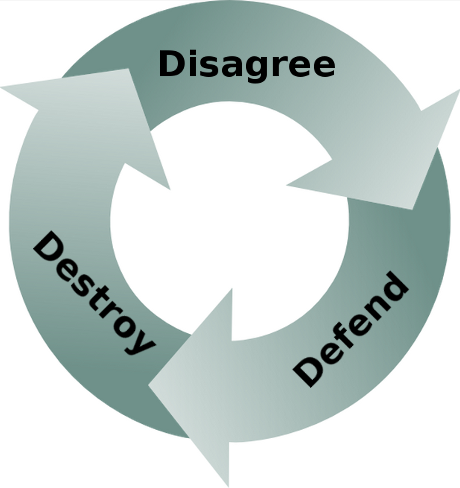
All conflicts start with disagreements.  The Communications Catalyst2 talks about the following cycle:
  • Disagree
  • Defend
  • Destroy
When you disagree with your coworkers then they don't feel listened to.  They will then defend their position by digging in their heels, then you will dig in your heels and the road to destruction starts. If there are any annoying habits present then the conflict will escalate quickly.

If things get out of hand then people start taking sides and productivity takes a major hit. In the worst conflicts this leads to loss of key personnel, which has been measured to be:

Loss of key personnel, productivity -16%, quality -22%

Losing key personnel who have comprehensive knowledge of business rules and organizational practices tied up in their heads often causes projects to face fault and come to a stand still. You may feel justified in starting a conflict or escalating one, however, as clever as you think you are, conflict hurts everyone -- yourself included.  Just remember:

It is virtually impossible to start/escalate a conflict that doesn't boomerang back and bite you in the @ss!

4 Ways to Avoid or Reduce Conflicts

Things to consider to avoid conflict:
  • Don't disagree first, signal that the other person has been heard
    • You will rarely agree with everything that someone else says, but start by agreeing with the part that you do agree with.1 This will at least signal that you have heard them and reduce their anxiety that you are not listening to them.
    • Even mechanically echoing everything that they just said is a way to signal that you heard what was said.
    • Once this is done, then talk about what you don't agree with.
  • Don't interrupt people.
    • When you are excited and thoughts are springing to mind then you may be tempted to do all the talking and stop listening; get this under control, take a breath, and let others talk.
    • People generally consider it rude when you interrupt and will assume arrogance on your part.  If you are not trying to be arrogant and someone tells you this then wake up -- you need to listen.
  • Don't be frustrated when people don't understand you
    • If you really know something that others don't then simply restating your point of view will not improve their understanding.
    • If your friend is lost in a new shopping mall then describing your location will not be helpful in helping him find you.  You need to find out where he is and walk him through the steps of getting to your location.
    • Be open to the idea that there might be something that you are not seeing.  With additional information you might revise your point of view.
  • Don't automatically assume that someone is insulting you
    • In virtually every case where someone feels insulted this is a knee-jerk reaction to a misunderstanding where no insult was intended.
    • Jumping to conclusions is not good under any circumstance, but is lethal in social interactions.
Managers should be on the lookout for the signs of conflict and clear them up while they are still small.  Most conflicts arise from simple misunderstandings. You will notice that most organizations will promote people based on their ability to work with others and resolve conflicts over competence.

Learning how to resolve conflicts is likely your ticket to an overdue promotion...

Other articles in the "Loser" series

Moo?

Want to see more sacred cows get tipped? Check out
Make no mistake, I am the biggest "Loser" of them all.  I believe that I have made every mistake in the book at least once :-)

References

  1. Carnegie, Dale.  How to Win Friends and Influence People. 1998.
  2. Connolly, Mickey and Rianoshek, Richard.  The Communication Catalyst, 2002.
  3. Jones, Capers and Bonsignour, Olivier.  The Economics of Software Quality.  Addison Wesley.  2011
  4. Kahneman, Daniel. Thinking Fast and Slow. 2011

Side Note

My best friend also works in the tech sector, and despite being friends for almost 25 years we have very few beliefs or habits in common.  There are subjects that we agree on, but then we don't agree on how they should be handled.

Even though we are very different people this has never stood in the way of us being able to do things together.  If you look around you will see radically different people that manage to cooperate and even thrive.

The key to all working relationships especially when the other person is very different from you is respect.

Monday, 9 June 2014

Don't be a Slave to Your Tools

Developers attach quickly to tools because they are concrete and have well defined behavior.  It is easier to learn a tool than to learn best practices or methodology. Tools only assist in solving problems, they can't solve the problem by themselves.

A developer who understands the problem can use tools to increase productivity and quality. Poor developers don't invest the time or effort to understand how to code properly and avoid defects.  They spend their time learning how to use tools without understanding the purpose of the tool or how to use it effectively.

To some degree, this is partially the fault of the tool vendors.  The tool vendors perceive an opportunity to make $$$$$ based on providing support for a common problems, such as:
  • defect trackers to help you manage defect tracking
  • version control systems to manage source code changes
  • tools to support Agile development (Version One, JIRA)
  • debuggers to help you find defects
There are many tools out there, but let's just go through this list and point out where developers and organizations get challenged.  Note, all statistics below are derived from over 15,000 projects over 40 years.1

Defect Trackers

Believe it or not, some organizations still don't have defect tracking software. I've run into a couple of these companies and you would not believe why. The effect of not having a defect tracking system is pretty severe, and there is evidence to prove this.

Inadequate defect tracking methods: productivity -15%, quality -21%

So we are pretty much all in agreement that we need to have defect tracking; we all know that the ability to manage more than a handful of defects is impossible without some kind of system

Automated defect tracking tools: productivity +18%, quality +26%

The problem is that developers disagree over what might be the best defect tracking system. The real problem is that almost every defect tracking system is poorly set-up, leading to poor results. Virtually every defect tracking system when configured properly will yield tremendous benefits. The most common pitfalls are:
  • Introducing irrelevant attributes into the defect lifecycle status, i.e. creation of statuses like deferred, won't fix, or functions as designed
  • Not being able to figure out if something is fixed or not
  • Not understanding who is responsible for addressing a defect
The tool vendors are happy to continue to provide new versions of defect trackers. However, using a defect tracker effectively has more to do with how the tool is used rather than which tool is selected.

One of the most fundamental issues that organizations wrestle with is what is a defect?  A defect only exists if the code does not behave according to specifications. But what if there are no specifications or the specifications are bad?  See It's not a bug, it's... for more information.

Smart organizations understand that the way in which the defect tracker is used will make the biggest difference.  Discover how to get more out of you defect tracking system in Bug Tracker Hell and How to Get Out.

Another common problem is that organizations try to manage enhancements and requirements in the defect tracking system.  After all whether it is a requirement or a defect it will lead to a code change, so why not put all the information into the defect tracker?  Learn why managing requirements and enhancements in the defect tracking system is foolish in Don't manage enhancements in the bug tracker.

Version Control Systems

Like defect tracking systems most developers have learned that version control is a necessary hygiene procedure.  If you don't have one then you are likely to catch a pretty serious disease (and at the least convenient time)

Inadequate change control: productivity -11%, quality -16%

Virtually all developers dislike version control systems and are quite vocal about what they can't do with their version control system.  If you are the unfortunate person who decided on the version control system,  just understand that there are hordes of developers out their cursing you behind your back.

Version control is simply chapter 1 of the story.  Understanding how to chunk code effectively, integrate with continuous build technology, and making sure that the defects in the defect tracker refers to the correct version are just as important as the choice of version control system.

Tools to support Agile

Sorry Version One and JIRA, the simple truth is that using an Agile tool does not make you agile, see this.

These tools are most effective when you actually understand Agile development.  One of my most effective Agile implementations only used Google docs in the implementation.

Enough said.

Debuggers

I have written extensively about why debuggers are not the best primary tools to track down defects. So I'll try a different approach here. :-)

One of the most enduring sets of ratios in software engineering has been 1:10:100.  That is, if the cost of tracking down a defect pre-test (i.e. before QA) is 1, then it will cost 10x if the defect is found by QA, and 100x if the defect is discovered in deployment by your customers. Most debuggers are invoked when the cost function is in the 10x or 100x part of the process.

It is not that I dislike debuggers -- I simply believe in using pre-test defect removal strategies because they cost less and lead to higher code quality. Pre-test defect removal strategies include:
  • Planning code, i.e. PSP
  • Test driven development, TDD
  • Design by Contract (DbC)
  • Code inspections
  • Pair programming for complex sections of code
You can find more information about this in:

Seldom Used Tools

Tools that can make a big difference but many developers don't use them:

Automated static analysis: productivity +21%, quality +31%

Automated sizing in function points: productivity +17%, quality +24%

Automated quality and risk prediction: productivity +16%, quality +23%

Automated test coverage analysis: productivity +15%, quality +21%

Automated deployment support: productivity +15%, quality +20%

Automated cyclomatic complexity computation: productivity +15%, quality +20%

Important Techniques with No Tools

There are a number of techniques available in software development that tool vendors have not found a way to monetize on. These techniques tend to be overlooked by most developers, even though they can make a huge difference in productivity and quality.

The Personal Software Process (PSP) and Team Software Process (TSP) were developed by Watts Humphrey, one of the pioneers of building quality software.

Personal software process: productivity +21%, quality +31%2

Team software process: productivity +21%, quality +31%3
Code inspections: productivity +21%, quality +31%4

Requirement inspections: productivity +18%, quality +27%4

Formal test plans: productivity +17%, quality +24%

Function point analysis (IFPUG): productivity +16%, quality +22%

The importance of inspections is covered in:

Conclusion

There is definitely a large set of developers that assume that using a tool makes them competent.

 The reality is that learning a tool without learning the principles that underlie the problem you are solving is like assuming you can beat the great Michael Jordan at basketball just because you have great running shoes.

Learning tools is not a substitute for learning how do do something competently.

Competent developers are continually learning about techniques that lead to higher productivity and quality, whether or not that technique is supported by a tool.

References

Friday, 16 May 2014

Are Debuggers Crutches?

Debuggers have become powerful tools, but like a drug have we become too dependent on them? Since poor developers spend 25 times more time in the debugger there is a likelihood that people are zoning out in the debugger instead of using other methods.

Defects are common, but they are not not necessary.  They find their way into code because:
Defect correction is only possible if you understand the code pathways, debuggers are not the best way to do this

Debuggers are commonly used by developer's to understand a problem, but just because they are common does not make them the best way to find defects.  I'm not advocating a return to "the good old days" but there was a time when we did not have debuggers and we managed to debug programs.

Note: in embedded systems it is very hard to get feedback if you do not use a debugger (or hardware debugger).  This article is not addressed to embedded developers who rarely have an alternative to a debugger.


Avoid Defects

The absolute best way to remove defects is simply not to create them in the first place. You can be skeptical, but things like  the Personal Software Process (PSP) have been used practically to prevent 1 of every 2 defects from getting into your code.  Over thousands of projects:

The Personal Software Process increases productivity by 21% and increases code quality by 31%1

A study conducted by NIST in 2002 reports that software bugs cost the U.S. economy $59.5 billion annually. This huge waste could be cut in half if all developers focused on not creating defects in the first place.

Not only does the PSP focus on code planning, it also makes developers aware of how many defects they actually create.  Here are two graphs that show the same group of developers and their defect injection rates before and after PSP training.2

Before PSP training After PSP training


Finding Defects

Using a debugger to understand the source of a defect is definitely one way.  But if it is the best way then why do poor developers spend 25 times more time in the debugger than a a good developer? (see No Experience Required!)

Poor developers spend a week in the debugger for every 2 hours that good developer does

No one is saying that debuggers do not have their uses.  However, a debugger is a tool and is only as good as the person using it.  Focus on tools obscures lack of skill (see Agile Tools do NOT make you Agile)

If you are only using a debugger to understand defects then you will be able to remove a maximum of about 85% of all defects, i.e. 1 in 7 defects will always be present in your code.

Would it surprise you to learn that their are organizations that achieve 97% defect removal3?  Software inspections take the approach of looking for all defects in code and getting rid of them. Learn more about software inspections and why they work here:

Software inspections increase productivity by 21% and increases code quality by 31% 

Even better, people trained in software inspections tend to inject fewer defects into code. When you become adept at parsing code for defects then you become much more aware of how defects get into code in the first place.

But interestingly enough, not only will developers inject fewer defects into code and achieve defect removal rates of up to 97%, in addition:

Every hour spent in code inspections reduces formal QA by 4 hours

Conclusion

As stated above, there are times where a skilled professional will use a debugger correctly.  However, if you are truly interested in being a software professional then:
  • You will learn how to plan and think through code before using the keyboard
  • You will learn and execute software inspections
  • You will learn techniques like PSP which lead to you injecting fewer defects into the code
You are using a debugger as a crutch if it is your primary tool to reduce and remove defects

Related Articles

Want to see more sacred cows get tipped? Check out:
Moo?

Make no mistake, I am the biggest "Loser" of them all.  I believe that I have made every mistake in the book at least once :-)


References

Wednesday, 16 April 2014

Productive Developers are Smart and Lazy

When I use the terms Smart, Lazy, and Developer; I mean the following:
  • Developer as in energetic and focused on building real-world code solutions
    • Not a dreamer who never gets around to writing anything practical
  • Smart as in able to think things through (i.e. not smart-ass)
  • Lazy as in lazy-loading, that is taking time to write code (i.e. not couch potato)
Good development is lazy development a.k.a. patient development; it happens when the developer spends the time necessary to think through all the pathways of the solution that he is developing BEFORE writing the code. That is lazy-writing of code, i.e. not writing code before the problem is understood.  The more due diligence a developer does to make sure that he is writing the correct code will reduce the amount of code that needs to be written.

This due diligence takes the form of:
  • Really understanding the requirements and getting product management (business analysts) to be clear on what are the ACTUAL requirements
    • They often are not given time to gather requirements
    • They often don't have access to the right subject matter experts
    • They sometimes have very poor abilities to synthesize consistent and complete requirements (see When BA means B∪ll$#!t Artist)
  • Really making sure that you understand how you are interfacing to other developers on your team and other teams, this involves:
    • collaboration in front of a white board
    • producing diagrams (UML and Visio)
It takes time to do this due diligence to make sure that you have consistent requirements and to make sure that you will have consistent interfaces with your peers.  However, developers are eager to start banging out code and spend hours at their desks banging out code.

In reality, less than 5% of that time is spend productively (see The Programmer Productivity Paradox).  If you see developers spending 100% of their time staring at their screens with no human interaction then you are looking at some of the worst developers.

It is a bad sign if developers are always coding

Productive developers are constantly checking their understanding of the requirements and making sure that they are staying in sync with their team's code.  Productive developers are in regular contact with the product managers/business analysts and can often be seen white boarding with their peers and architects. There are definitely developers who use their years of experience to become more productive, in fact among the best developers:
  • the ratio of initial coding time was about 20 to 1
  • the ratio of debugging times over 25 to 1
  • program execution speed about 10 to 1
  • program size 5 to 1
However, in the aggregate, developers do not become more productive over time (see No Experience Necessary!), i.e. over thousands of developers there is no correlation between years of experience and productivity.  In fact, we have measured productivity regularly 8 times over the last 50 years and years of experience do not correlate (in the aggregate) with productivity.

Why is lazy writing of code so important?

Code is often written before the requirements are understood or gathered.  In addition, quickly written code often fails to fit with everyone else's code; often, it is only during integration that this problem is discovered.   Good developers are patient and realize that there is a cost to writing code quickly.

Developers become psychologically attached to their code 

Bad developers are reluctant to change poorly written code.  Rather than rewrite suboptimal code, bad developers will simply add more code to make up for deficiencies. Even worse, they tend to blame everyone else for having bad code.  What you end up with is band-aid after band-aid that lead to a severely buggy and unstable system.

Don't get me wrong, good developers can find themselves in a situation where they have written sub-optimal code.  The difference is that a good developer will recognize a problematic section of code and:
  • Refactor the code if the code is largely doing the right thing
  • Rewrite the the code otherwise
When developers produce and maintain sub-optimal code, it becomes harder and harder to change this code as time goes on.  That is because their peers will need to write code that interfaces with the suboptimal code and build clumsy interfaces or work-arounds to make the code work. As the code base grows, too many later code units rely on the functionality of this initial code.  Of course, the later code can do little to increase the stability of the code and bugs multiply when simple changes are made; in short, development becomes slower and slower.

When in doubt, be lazy and write code late

Other relevant articles: