Showing posts with label Resources. Show all posts

Wednesday, 16 April 2014

Productive Developers are Smart and Lazy

When I use the terms Smart, Lazy, and Developer; I mean the following:
  • Developer as in energetic and focused on building real-world code solutions
    • Not a dreamer who never gets around to writing anything practical
  • Smart as in able to think things through (i.e. not smart-ass)
  • Lazy as in lazy-loading, that is taking time to write code (i.e. not couch potato)
Good development is lazy development a.k.a. patient development; it happens when the developer spends the time necessary to think through all the pathways of the solution that he is developing BEFORE writing the code. That is lazy-writing of code, i.e. not writing code before the problem is understood.  The more due diligence a developer does to make sure that he is writing the correct code will reduce the amount of code that needs to be written.

This due diligence takes the form of:
  • Really understanding the requirements and getting product management (business analysts) to be clear on what are the ACTUAL requirements
    • They often are not given time to gather requirements
    • They often don't have access to the right subject matter experts
    • They sometimes have very poor abilities to synthesize consistent and complete requirements (see When BA means B∪ll$#!t Artist)
  • Really making sure that you understand how you are interfacing to other developers on your team and other teams, this involves:
    • collaboration in front of a white board
    • producing diagrams (UML and Visio)
It takes time to do this due diligence to make sure that you have consistent requirements and to make sure that you will have consistent interfaces with your peers.  However, developers are eager to start banging out code and spend hours at their desks banging out code.

In reality, less than 5% of that time is spend productively (see The Programmer Productivity Paradox).  If you see developers spending 100% of their time staring at their screens with no human interaction then you are looking at some of the worst developers.

It is a bad sign if developers are always coding

Productive developers are constantly checking their understanding of the requirements and making sure that they are staying in sync with their team's code.  Productive developers are in regular contact with the product managers/business analysts and can often be seen white boarding with their peers and architects. There are definitely developers who use their years of experience to become more productive, in fact among the best developers:
  • the ratio of initial coding time was about 20 to 1
  • the ratio of debugging times over 25 to 1
  • program execution speed about 10 to 1
  • program size 5 to 1
However, in the aggregate, developers do not become more productive over time (see No Experience Necessary!), i.e. over thousands of developers there is no correlation between years of experience and productivity.  In fact, we have measured productivity regularly 8 times over the last 50 years and years of experience do not correlate (in the aggregate) with productivity.

Why is lazy writing of code so important?

Code is often written before the requirements are understood or gathered.  In addition, quickly written code often fails to fit with everyone else's code; often, it is only during integration that this problem is discovered.   Good developers are patient and realize that there is a cost to writing code quickly.

Developers become psychologically attached to their code 

Bad developers are reluctant to change poorly written code.  Rather than rewrite suboptimal code, bad developers will simply add more code to make up for deficiencies. Even worse, they tend to blame everyone else for having bad code.  What you end up with is band-aid after band-aid that lead to a severely buggy and unstable system.

Don't get me wrong, good developers can find themselves in a situation where they have written sub-optimal code.  The difference is that a good developer will recognize a problematic section of code and:
  • Refactor the code if the code is largely doing the right thing
  • Rewrite the the code otherwise
When developers produce and maintain sub-optimal code, it becomes harder and harder to change this code as time goes on.  That is because their peers will need to write code that interfaces with the suboptimal code and build clumsy interfaces or work-arounds to make the code work. As the code base grows, too many later code units rely on the functionality of this initial code.  Of course, the later code can do little to increase the stability of the code and bugs multiply when simple changes are made; in short, development becomes slower and slower.

When in doubt, be lazy and write code late

Other relevant articles:

Sunday, 9 March 2014

The Programmer Productivity Paradox

Programmers seem to be productive people.

You always see them typing at their desks; they chafe for meetings to finish so that they can go back to their desks and code. When asked, they will say that there is not enough time to produce the code, and the sooner they can start coding, the sooner they will be done.

So writing code must be the most important thing, correct?

If the average programmer writes about 50 lines of production code a day.  A 50,000 line program would take 1,000 man days to produce.  The same 50,000 line listing can be entered by a programmer at about 1,000 lines a day or about 50 man days.

So what the heck are the developers doing for the other 950 days?

Before addressing the apparent contradiction, lets make a simple observation. Many methodologies (RUP, XP, Agile, Waterfall, etc) and programming languages have been compared over thousands of projects and we have determined that programmers write between 325 and 750 lines of code (LOC) per month.

That means  the 1,000 LOC per month suggested above is optimistic1.  Even if programmers do not average 50 lines of code per day, the following is clear2.
  • Methodology does not explain the apparent productivity gap
  • No language accounts for the apparent productivity gap
The reality is that only a fraction of a developer's time is actually spent writing production code. What developers are really doing is trying different combinations of code until they finally find the combination of code that works.

Or more correctly, the combination that yields a solution that neither QA nor the business analyst complains about.

That is why developers that plan their code before coding tend to outperform other developers. Few developers plan their code, but surprisingly, years of experience does not teach developers to learn to plan.  Studies over 40 years show that developer productivity does not change with years of experience. (see No Experience Required!)

Years of experience do not lead to higher productivity

Interestingly enough, there are methodologies that have been around for a long time that emphasize planning code.  Watts Humphrey is the created of the Personal Software Process (PSP)3.  Using PSP has been measured to:

PSP can raise productivity by 21% and quality by 31%

If you are interested there are many other proven methods of raising code quality that are not commonly used (see Not Planning is for Losers).

If your developers at their keyboard and not planning at a white board then odds are that your productivity is not as high as it could be.

If developers are spending all their time trying different combinations of code until QA is satisfied, then it means that most of their time is really spent establishing correct pathways and removing defects.  If you think about it, not having the correct pathways is a defect, so:

The reality is that there is not enough time to find the defects in the quickly written code

Interested in reducing defects in a cost-effective way? See Defects are for Losers.

Bibliography

1 The The Mythical Man Month is even more pessimistic suggesting that programmers produce 10 production lines of code per day
2 Jones, Capers and Bonsignour, Olivier.  The Economics of Software Quality.  Addison Wesley.  2011
3 Watts, Humphrey.  Introduction to the Personal Software Process, Addison Wesley Longman. 1997

Articles in the "Loser" series

Want to see more sacred cows get tipped? Check out:
Moo?
Make no mistake, I am the biggest "Loser" of them all.  I believe that I have made every mistake in the book at least once :-)

Tuesday, 3 December 2013

What the Heck are Non-Functional Requirements?

If functional requirements are for the end-users (customers), then who are the non-functional requirements for?

Non-functional requirements are for those that install and maintain operational code, i.e. the help desk and operators

Every developer needs to be aware of what those non-functional requirements are and why operations personnel and help desk personnel are indirect  customers that are really  important.  There is no way for these guys to be unhappy and it not to back up into development as an urgent problem!

Functional Requirements

Functional requirements are baked into the code that developer's deliver (interpreted or compiled).   Events from input devices (network, keyboard, devices) trigger functions to convert input into output -- all functions have the form:


This is true whether you use an object-oriented language or not.

Non-functional requirements involve everything that surrounds a functional code unit.  Non-functional requirements concern things that involve time, memory, access, and location:

Performance
  • Server must be able to handle 100 transactions a second
  • End user must have less than 1 second response
Availability
  • The service has to be available 99.99% of the time during the service hours
Capacity
  • During service hours the server must support 700 simultaneous users
Continuity
  • Service is resilient to disk, machine, and operational center failure
Security
  • Ensure that only people authorized to access the service can
  • Ensure that data is never corrupted due to illegal activity or machine failure

I won't spend any time on performance because this is the non-functional requirement that everyone understands.

Non-functional requirements are slightly different between desktop applications and services; this article is focused on non-functional requirements for services.

If you have any knowledge of ITIL you will recognize that the highlighted items deal with the warranty of a service.  In fact, the functional requirements involve the utility of a service, the non-functional requirements involve the warranty of a service.

Availability

Availability is about making sure that a service is available when it is supposed to be available. Availability is about a Configuration Item (CI) in the environment of the operations center that specifies how the code is accessed.  Availability is decided independently of the code and is at best part of the Service Design Package (SDP) that is delivered to the operations department.

Developer's need to be aware of single-points of failure (i.e. services hard-coded to a specific IP) which causes fits in operations that are not running virtual machines (VM) that can have virtual IPs . The requirement to create code that is not reliant on static IPs or specific machines is a non-functional requirement.  Availability is simplified in operations if the code is resilient enough to allow itself to easily move (or be replicated) among servers.

Availability non-functional requirements include:
  • Code to verify that customers are in their user windows
  • Automatic installation of CI or mechanisms
  • Ability to detect and prevent manual errors for a CI
  • Ability to easily move code between servers

Capacity

Capacity is about delivering enough functionality when required.  If you ask a web service to supply 1,000 requests a second when that server is only capable of 100 requests a second then something will fail.

This may look like an availability issue, but it is caused because you can't handle the capacity requested.

Internet services can't provide enough capacity with a single machine and operations personnel need to be able to run multiple servers with the same software to meet capacity requirements.  The ability to run multiple servers without conflicts is a non-functional requirement. The ability to take a failing node and restart it on another machine or VM is a non-functional requirement.

Capacity non-functional requirements include:
  • Ability to run multiple instances of code easily
  • Ability to easily move a running code instance to another server

Continuity

Continuity involves being able to be robust against major interruptions to a service, these include power outages, floods or fires in an operational center, or any other disaster that can disrupt the network or physical machines.

Where availability and capacity often involve redundancy inside a single operation center, continuity involves geographic and network redundancy.  Continuity at best involves having multiple servers that can work in geographically distributed operation centers.  At worst, you need to be able to have a master-slave fail over model with the ability to journal transactions and eventually bring the master back up.

Continuity non-functional requirements include:
  • Resilience of a code base to potential network outages, i.e. ability to retry transactions or find a new server
  • Making sure that correct error messages are returned when physical failures are encountered, i.e. if the network is unavailable then don't give the end-user a message "Customer record has errors, please correct".
  • Ability to recognize inconsistent data and not continue to corrupt data inside the database.


Security
Security non-functional requirements concern who has access to functions and preventing the integrity of data from being corrupted.

Where access is concerned, how difficult will it be for operations personnel or help desks to set up security for users?

Developer's build in different levels of access into their applications without considering how difficult it will be for a 3rd party (help desk or operations) to set-up end users.

Data integrity is another non-functional requirement.  Developer's need to consider how their applications will behave if the program encounters corrupted data due to machine or network failures.  This is not as important an issue in environments using RAID or redundant databases.

Security non-functional requirements include:
  • Ease of a help desk to set up a new user on an application
  • Ability to configure a user's rights to enable them only to access the functions that they have a right to
  • Ensuring through data redundancy or consistency algorithms that data is not corrupted


When You Forget Non-Functional Requirements...

Commonly start-ups are so busy setting up their services that the put non-functional requirements on the back burner.  The problem is that there are non-functional requirements that need to be designed into the architecture when software is created.

For example, it is easy to be fooled into building software that is tied to a single machine, however, this will not scale in operations and cause problems later on.  One of the start-ups I was with built a server for processing credit/debit card transactions without considering non-functional requirements (capacity, continuity).

 It cost more to add the non-functional requirements than it cost to develop the software!

Every non-functional requirement that is not thought through at the inception of a project will often represent significant work to add later on.  Every such project is a 0 function point project that will require non zero cost!

Generally availability, capacity, and continuity is not a problem for services developed with cloud computing in mind.  However, there are thousands of legacy services that were developed before cloud computing was even possible.

If you are developing a new service then make sure it is cloud enabled!

Operations People are People Too

Make no mistake, operations and help desk personnel are fairly resourceful and have learned how to manage software where non-functional requirements are not addressed by the developers.

Hardware and OS solutions exist for making up for poorly written software that assumes single machines or does not take into account the environment that the code is running in, but that can come at a fairly steep cost in infrastructure.

The world has moved to services and it is no longer possible for developers to ignore the non-functional requirements involved with the code that they are developing.  Developer's that think through the non-functional requirements can reduce costs dramatically on the bottom line and quality of service being delivered.

The guys that run  operational centers and help desks are customers that are only slightly less important than the end-user.  Early consideration of the non-functional requirements makes their lives easier and makes it much easier to sell your software/services. It is no longer possible for competent developers to be unaware of non-functional requirements.


Other Articles
No Experience Necessary Counter-intuitive evidence why years of experience does not make developers more productive
Shift Happens Why scope shift on development projects is inevitable and why not capturing requirements at the start of a project can doom it to failure.
Inspections are not Optional Software inspections are intensive but evidence shows that for each hour of inspection you can reduce QA by 4 hours!

Tuesday, 29 January 2013

Death March Calculus

In the previous post Stop It! No… really stop it. we talked about 5 worst practices and their impact on a software project.  However, all 5 worst practices will be present in a Death March.

Ed Yourdon, one of the pioneers in software engineering, wrote "Death March" to describe the common practice of setting up a software project which is not feasible.

That is, between the time, resources, and functionality (quality) desired for the project, there is no way to complete the project successfully.   Ed states that a death march is one in which one of the project parameters exceeds the norm by at least 50%.

A death march project is often known by the entire project team to be virtually impossible to succeed at.  To understand some of the motivation of why senior management creates death marches or why people participate in them you would need to read Ed's book.


In the previous article we showed this table:

Worst Practice Productivity Quality
Friction/antagonism among team members -12.0% -15.0%
Friction/antagonism among management -13.5% -18.5%
Inadequate communications with stakeholders -13.5%
-18.5%
Layoffs/loss of key personnel -15.7% -21.7%
Excessive schedule pressure -16.0% -22.5%

Since senior management has asked for specific functionality that can not be produced by the current team in the given time frame, the first problem is the presence of excessive schedule pressure.  So right at the start of the project your productivity will be down 16% and quality will be down 22.5%.

With a compressed time schedule there will not be enough time to capture all the requirements from the stakeholders.  You will have to settle for partial requirements and hope to interpolate the missing requirements.  This will cause inadequate communications with stakeholders and drop the productivity 13.5% and the quality by 18.5%.  Unfortunately, these effects are cumulative with the excessive schedule pressure and you will now be down 29.5% productivity and 41% on quality.


There is no shortage of opinions in a software team; in the best teams they combine their opinions to make the best decisions.  When time is compressed we don't make good decisions in our teams and end up with friction at the management and team level. This will cause us to have friction/antagonism among management because they will have different opinions on how to execute the death march;  antagonism in management will lead to friction/antagonism among team members. These two issues will combine to drop productivity by 27% and quality by 37%.  The cumulative effect of all practices will have productivity down 64.5% and quality down by 78%.

When the project is obviously not going well, people will quit and/or be fired.  In particular, key personnel have a tendency to leave because they are the ones that have the easiest time finding new employment. If this happens then the final numbers will be productivity down 86.2% and quality down by 98.7%.


If you don't believe the numbers then you have never been on a death march!

The problem is that excessive schedule pressure will inevitably cause the other worst practices to come into existence.  Starting a project where excessive schedule pressure is present is virtually a guarantee that failure will occur.  In fact, the only death marches that have a chance at success are small teams with projects that are 3-6 months long.

Possible Way Out

The only way to solve the problem of excessive schedule pressure is to balance the three elements (time, resources, and functionality) of the project until you have a feasible project.  Since project teams are relatively fixed this means:
  • reducing the functionality that needs to be produced
  • moving back the project end date
  • both reducing functionality and moving back the project end date
Experienced project managers on a death march will be aggressively reducing scope as soon as the project starts.  But this is no guarantee that they will get rid of enough functionality to bring the project into a feasible state.

If your organization has put you on a death march then the only possible solution is to find another job.  Hoping that somehow a successful project will result when you start off with excessive schedule pressure is futile, the mathematics shows that project failure is a virtual certainty.

You have more chances of winning big in the lottery and retiring than of completing a death march successfully.


Friday, 14 September 2012

Bug Tracker Hell and How To Get Out!

Whether you call it a defect or bug or change request or issue or enhancement you need an application to record and track the life-cycle of these problems.  For brevity, let's call it the Bug Tracker.

Bug trackers are like a roach motel, once defects get in they don't check out!  Because they are append only, shouldn't we be careful and disciplined when we add "tickets" to the bug tracker?  We should, but in the chaos of a release (especially start-ups :-)) the bug tracker goes to hell.

Bug Tracker Hell happens when inconsistent usage of the tool leads to various problems such as duplicate bugs, inconsistent priorities and severities.  While 80% of defects  are straight forward to add to the Bug Tracker, it is the other 20% of the defects that cause real problems.

The most important attribute of a defect is its DefectLifecycleStatus; not surprisingly every Bug Tracker makes this the primary field for sorting.   This primary field is used to generate reports and to manage the defect removal process.  If we manage this field carefully we can generate reports that not only help the current version but also provide key feedback for post-mortem analysis.

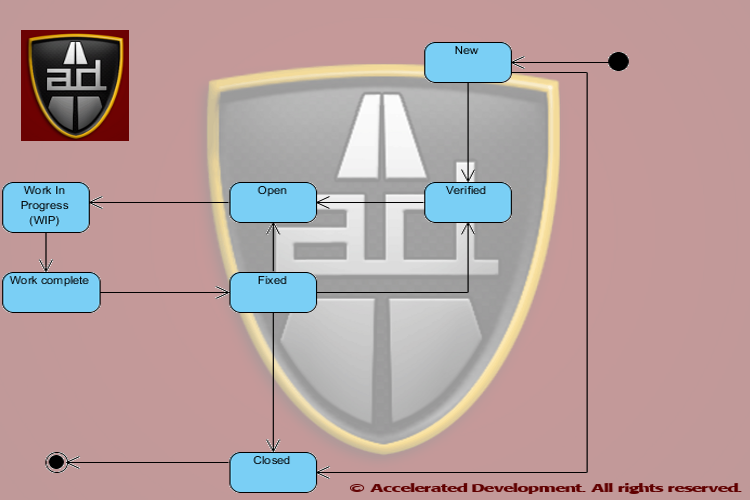
Every Bug Tracker has at least the states Open, Fixed, and Closed, however, due to special cases we are tempted to create new statuses for problems that have nothing to do with the life cycle.  The creation of life cycle statuses that are not life cycle states is what caused inconsistent usage of the tool because then it becomes unclear how to enter a defect.

It is much easier to have consistent life cycle states than to have a 10 page manual on how to enter a defect.


(This color is used to indicate a defect attribute, and this color is used to indicate a constant.)

What Life Cycle States Do We Need?

Clearly we want to know how many Open defects need to be fixed for the  current release; after all, management is often breathing down our neck to get this information.

Ideally we would get the defects outstanding report by finding out how many defects are Open. Unfortunately, there are numerous open defects that will not be fixed in the current release (or ever :-( ) and so we seek ways to remove those defects from the defects outstanding.

Why complicate life?
In particular we are tempted to create states like Deferred,  WontFix, and FunctionsAsDesigned, to remove defects from the  defects outstanding. These states have the apparent effect of simplifying the defects outstanding report but will end up complicating other matters.

For example, Deferred is simply an open defect that is not getting fixed in the current release; WontFix is an open defect that  the business has decided not to fix; and FunctionsAsDesigned indicates that either the requirements were faulty or QA saw a phantom problem, but once this defect gets into the Bug Tracker you can't get it out. All three states above variants of the Open life cycle state and creating these life cycle states will create more problems than they solve. The focus of this article is on how to fix the defect life cycle, however, other common issues are addressed.

Life cycle states for Deferred, WontFix, or FunctionsAsDesigned is like a "Go directly to Bug Tracker Hell" card!


Each Defect Must Be Unambiguous

The ideal state of a Bug Tracker is to be able to look at any defect in the system and have a clear answer to each of the following questions.
  • Where is the defect in the life-cycle?
  • Has the problem been verified?
  • How consistently can the problem be reproduced or is it intermittent?
  • Which team role will resolve the issue? (team role, not person)
The initial way to get out of hell is to be consistent with the life cycle state.

Defect Life Cycle

All defects go through the following life cycle (DefectLifecycleStatus) regardless of whether we track all of these states or not:
  • New
  • Verified
  • Open
  • Work in Process
  • Work complete
  • Fixed
  • Closed


Anyone should be able to enter a New defect, but just because someone thinks"I tawt I taw a defect!" in the system doesn't mean that the defect is real.  In poorly specified software systems QA will often perceive a defect where there is none, the famous functions as designed (FAD)  issue.

FAD = Requirements or test defect; if someone thought there was a defect then requirements are insufficient or the test plan is incorrect or someone did not follow a test plan.  You have a defect, it is just not in engineering.

Since there are duplicate and phantom issues that are entered into the Bug Tracker, we need to kick the tires on all New defects before assigning them to someone.  It is much faster and cheaper to verify defects than to simply throw them at the development team and assume that they can fix them.

Trust But Verify

New defects not entered by QA should be assigned to the QA role.  These defects should be verified by QA before the life cycle status is updated to Verified.  QA should also make sure that the steps to reproduce the defect are complete and accurate before moving the defect to the Verified life cycle status.  Ideally even defects entered by QA should be verified by someone else in QA to make sure that the defect is entered correctly.

By introducing a Verified  state you separate out potential work from actual work. If a bug is a phantom then QA can mark it as Closed  it before we assign it to someone and waste their time.  If a bug is a duplicate then it can be marked as such, linked to the other defect, and Closed.

The advantage of the Verified status is that the intermittent bugs get more attention to figure out how to reproduce them.  If QA discovers that a defect is intermittent then a separate field in the Bug Tracker, Reproducibility, should be populated with one of the following values:
  • Always (default)
  • Sometimes
  • Rare
  • Can't reproduce
Defects hard to reproduce stay in the New state until you can reproduce them.  If you can't reproduce them then you can mark the issue as Closed without impacting the development team.


Assign the Defect to a Role

QA has a tendency to assume that all defects are coding defects -- however, the analysis of 18,000+ projects does not confirm this.  In The Economics of Software Quality, Capers Jones and Olivier Bonsignour show that defects fall into different categories. Below we give the category, the frequency of the defect, and the business role that will address the defect.

Note, only the bolded rows below are assigned to developers.


Defect Role Category Frequency Role
Requirements defect 9.58% BA/Product Management
Architecture or design defect 14.58% Architect
Code defect 16.67% Developer
Testing defect 15.42% Quality Assurance
Documentation defect 6.25% Technical Writer
Database defect 22.92% DBA
Website defect 14.58% Operations/Webmaster

Defect Role Categories are important to accelerating  your overall development speed!

Even if all architecture, design, coding, and database defects are handled by the development group this only represents 54% of all defects.  So assigning any New defect to the development group without verification is likely to cause problems inside the team.

Note, 25% of all defects are caused by poor requirements and bad test cases, not bad code.  This means that the business analysts and QA folks are responsible for fixing them.

Given that 46% of all defects are not resolved by the development team there needs to be a triage before a bug is assigned to a role.  Lack of bug triages is the Root cause of 'Fire-Fighting' in Software Projects.

The Bug Tracker should be extended to record the DefectRole in addition to the assigned attribute.  Just this attribute will help to straighten out the Bug Tracker!

Non-development Defects

Most Bug Tracking systems have a category called enhancement.  Enhancements are simply defects in the requirements and should be recorded but not specified in the Bug Tracker; the defect should be Open with a DefectRole of ProductManagement.

Enhancements need to be assigned to product managers/BAs who should document and include a reference to that documentation in the defect.  The description for the defect is not the proper place to keep requirements documentation.  The life cycle of a product requirement is generally very different from a code defect because the requirement is likely to be deferred to a later release if you are late in your product cycle.
Business requirements may have to be confirmed with the end users and/or approved by the business.  As such, they generally take longer to become work items than code defects.

QA should not send enhancements to development without involvement of product management.

Note that  15.42% of the defects are a QA problem and are fixed in the test plans and test cases.

Bug Triage

The only way to correctly assign resources to fix a defect is to have a triage team meet regularly that can identify what the problem is.  A defect triage team needs to include a product manager, QA person, and developer.   The defect triage team should meet at least once a week during development and at least once a day during releases.  Defect triages save you time because only 54% of the defects can be fixed by the developers; correctly assigning defects avoids miscommunication.

Effective bug triage meetings are efficient when the only purpose of the meeting is to correctly assign defects.  Be aggressive and keep design discussions out of triages. 

Defects should be assigned to a role and not a specific person to allow maximum flexibility in getting the work done; they should only be assigned to a specific person when there is only one person who can resolve an issue.

Assigning unverified and intermittent defects to the wrong person will start your team playing the blame game.

As the defects are triaged, product management (not QA) should set the priority and severity as they represent the business.  With a multi-functional team these two values will be set consistently.  In addition the triage team should set the version that the defect will be fixed.  Some teams like to put the actual version number where a defect gets fixed(i.e. ExpectedFixVersion) I prefer to use the following:
  • Next bug fix
  • Next minor release
  • Next major  release
  • Won't fix
I like ExpectedFixVersion because it is conditional, it represents a desire.  Like it (or not) it is very hard to guess when every defect will be fixed.  The reality is that if the release date gets pulled in or the work turns out to be more involved than expected the fix version could be deferred (possibly indefinitely).  If you guess wrong then you will spend a considerable amount of time changing this field.

Getting the Defect Resolved

Once the defects are in the system each functional role can assign the work to its resources.  At that point the defect life cycle state is Work In Progress.

All Work complete means is that the individual working on the defect believes that it is resolved.  When the work is resolved the FixVersion should be set as the next version that will be released.  Note, if you use release numbers in the ExpectedFixVersion field then you should update that field if it is wrong :-)
Of course the defect may or may not be resolved, however, the status of Work complete acts a signal that someone else has work to do.

If a requirements defect is fixed then the issue should be moved to Fixed and assigned to the development manager that will give the work to his team.  Once the team has verified their understanding of the requirement the defect can move from Fixed to Closed.

Work complete means that the fixer  believes that problem is resolved, Fixed means that the team has acknowledged the fix!

For code defects the Work complete status is a signal to QA to retest the issue.  If QA establishes that the defect is fixed they should move the issue to Fixed.  If the issue is not fixed at all then the defect should move back to Open; if the defect is partially fixed then the defect should move to Verified so that it goes back through the bug triage process (i..e severity and priority may have changed).

Once a release is complete, all Fixed items can be moved to Closed.

Tracking Defects Caused by Fixing Defects

Virtually all Bug Trackers allow you to link one or more issues together.  However, it is extremely important to know why bugs are linked, in most cases you link bugs because they are duplicates.
Bugs can be linked together because fixing one defect may cause another.  On average this happens for every 14 defects fixed but in the worst organizations can happen every 4 defects fixed.  Keeping a field called ResultedFromDefect where you link the number of the other defect allows you to determine how new defects are the result of fixing other defects.

Knowing how many defects are created while fixing others is important to improving your development process.


Summary

Let's recap how the above mechanisms will help you get out of hell.
  1. By introducing the Verified step you make sure that bugs are vetted before anyone get pulled into a wild goose chase.
    1. This also will catch intermittent defects and give them a home while you figure out how often they are occurring and work out if there is a reliable way to produce them.
    2.  If you can't reproduce a defect then at least you can annotate it as Can't Reproduce, i.e. status stays as New and it doesn't clog the system
  2. By conducting triage meetings with product management, QA, and development you will end up with very consistent uses of priority and severity
  3. Bug triages will end up categorizing defects according to the role that will fix them which will reduce or eliminate:
    1. The blame game
    2. Defects being assigned to the wrong people
  4. By having the ExpectedFixVersion be conditional you won't have to run around fixing version numbers for defects that did not get fixed in a particular release.  It also gives you a convenient way to tag a defect as Won't Fix, the status should go back to Verified.
  5. By having the person who fixes a defect set the FixVersion then you will have an accurate picture of when defects are fixed
  6. When partially fixed defects go back to Verified the priority and severity can be updated properly during the release.

Benefits of the Process

By implementing the defect life cycle process above you will get the following benefits:
  • Phantom bugs and duplicates won't sandbag the team
  • Intermittent bugs will receive more attention to determine their reproducibility
    • Reproducible bugs are much easier to fix
  • Proper triages will direct defects to the appropriate role
  • You will discover how many defects you create by fixing other defects
By having an extended set of life cycle states you will be able to start reporting on the following:
  • % of defects introduced while fixing defects (value in ResultedFromDefect)
  • % of New bugs that are phantoms or duplicates, relates to QA efficiency
  • % of defects that are NOT development problems, relates to extended team efficiency (i.e. DefectRole <> Development)
  • % of requirements defects which relates to the efficiency of your product management (i.e. DefectRole = ProductManagement)
  • % of defects addressed but not confirmed (Work Completed)
  • % of defects fixed and confirmed (Fixed)
It may sound like too much work to change your existing process, but if you are already in Bug Tracker hell, what is your alternative?


Need help getting out of Bug Tracker hell?  Write to me at dmahal@AcceleratedDevelopment.ca


Appendix: Importance of Capturing Requirements Defects

The report on the % of requirements defects is particularly important because it represents the amount of scope shift (creep) in your project.   You can see this in the blog Shift Happens.  Also, if the rates of scope shift of 2% per month are strong indicators of impending swarms of bugs and project failure. Analysis shows that the probability of a project being canceled is highly correlated with the amount of scope shift.  Simply creating enhancements in the Bug Tracker hides this problem and does not help the team.

Wednesday, 30 November 2011

Why Adding Personnel to a late Software Project delays it more

The previous blog entry explains how poor requirements and insufficient team synchronization mechanisms can lead to constant fire-fighting.  When faced with constant fire-fighting your project starts spinning out of control and code development will slow to a crawl.  At this time, management's first instinct is to throw more developers at the problem.

While adding resources to a late project seems like a logical thing to do, it generally makes the problem worse, i.e. leads to more fire fighting and even slower code production.  While it seems counter-intuitive, actually throwing people off the project is more likely to make your project move faster.  Fred Brooks, author of The Mythical Man-Month calls this principle Brook's law.

Different Types of Team Activity
Before we address why late projects slow down when you add resources, we must first review the different types of team activities and their inherent productivity characteristics.  When teams of people perform tasks they fall into one of three different categories: 1) additive, 2) disjunctive, and 3) conjunctive.

In an additive activity, the productivity of the group is determined by adding up the productivity of each of the individuals comprising the team, i.e. team productivity = (individual productivity)[1].  One additive activity is tug-of-war where the productive output of your team is equal to the sum of the pulling force of all the members of your team.  Another additive activity would be a team of people painting a house. 

Managers throw additional people into late projects on the assumption that coding is an additive activity, it isn’t; we'll cover why in a second.

In a disjunctive activity, the productivity of the group is determined by the strongest member of the team, i.e. team productivity = max(individual1, individual2, …, individualn).  A disjunctive activity would be playing Trivial Pursuit in large teams, if any person on the team gets the answer correct the whole team gets the correct.  In software projects disjunctive activities occur when there is a very specific technical problem to solve.  In the meeting, whoever solves the problem first will solve it for the entire team.

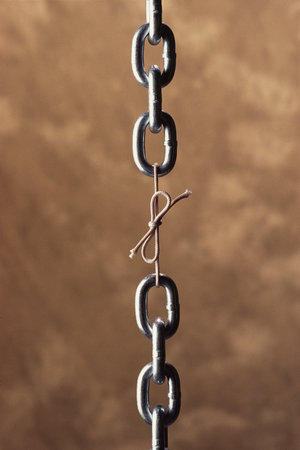
In a conjunctive activity, the productivity of the group is determined by the weakest member of the team, i.e. team productivity = min(individual1, individual2, …, individualn).  Conjunctive activities are equivalent to the weakest link in a chain.  Security is a conjunctive activity, you are only as secure as the weakest part of your security architecture.  Quality is a conjunctive activity and this is why we say "quality is everyone's job".  It only takes one poor quality component to reduce the quality of an entire product.

When an organization is unaware of critical conjunctive activities, they are likely to have all kinds of execution problems.

Understanding Requirements is a Conjunctive Activity
Software projects get into a fire fighting mode because there is a poor understanding of the requirements from a team perspective.  Whether the requirements were well written or not, if those requirements are poorly understood by the team then you start playing 6 blind men and the elephant. 

This is where you discover that everyone in your project has a different perspective on what the system is supposed to do and how it is supposed to do it.  The fire-fighting mode is nothing more than a set of meetings to resolve differences and solve problems caused by divergent beliefs on the project.

Understanding the requirements is a conjunctive activity.  Your productivity is only as good as the weakest understanding in the team.  The developer on the team with the weakest understanding of the requirements is probably generating the most defects.  If QA does not understand the requirements (if they exist) then they will be generating all kinds of false positives when they are unsure the software is behaving properly.

With this perspective, it is easy to see how adding people to a late project will cause it to be later.  The additional developers and QA being added to the project will have the poorest understanding of the requirements of all the team members.  This means that they will almost certainly generate more defects in development and cause even more false positives in QA.  This will increase the amount of fire-fighting that you do and cause the project to slow down even more.

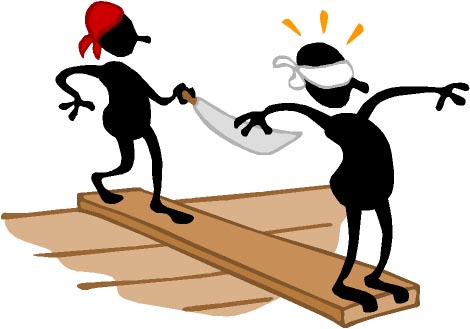
Solution: Throw People off the Ship
Walk the plank
So as counter-intuitive as it sounds, you need to throw people off the ship.  Find the developers and QA personnel who don't understand the requirements and remove them from the project.  These are the guys creating much of the noise in the fire-fighting meetings. 

Otherwise get these people together with the business analysts and educate them about what the software is supposed to do and how it is supposed to be done.  If you are going to add personnel to the team then this becomes an ideal time to get them educated on the requirements BEFORE they start producing or testing code.

While they are not working directly on the project have them put together the centralized requirements repository suggested in the last blog.  Once they are sufficiently familiar with the requirements then you can add them back to the software team.

Additional resource: The Mythical Man Month, by Fred Brooks

[1] ∑ is the Greek symbol used for summation