Showing posts with label FireFighting. Show all posts

Tuesday, 19 November 2013

Who should set defect priority?

Surprisingly, defect priority should not be set by QA.  QA are generally the owners of the defect tracking system and control it, but this is one attribute that they should not control.  The defect tracker is a shared resource between QA, engineering, engineering management, and product mangement and is a coordinating mechanism for all these parties.

Commonly people mix up priority and severity, for example, there may be a severe defect that causes the software either not to install or to cease functioning.

It is common for new releases to have various installation problems when they first get to QA. This blocks QA, so they mark the defects with a high severity and high priority.  This issue has a high severity and needs to be addressed right away, but remember bug tracking systems are append only -- once this defect gets into the system, it will never get out.  This kind of issue should be escalated to the engineers and engineering management because it makes little sense to clog the defect tracking system with it.

Now there may be intermittent issues that cause the software to fail and you may assume that this defect would be high priority, but if it occurs very rarely and would cost too much to fix then this defect may be a low priority.  Once again the priority of an intermittent severe issue can not be determined by QA.

Similarly, there may be many cosmetic or minor defects where fixing them might make a huge difference in the user experience and reduce support calls.  Even though these defects are minor, they may be easy to fix and save you serious money.  Once again, this can not be decided by QA.

Therefore, QA should reserve the right to set the initial severity, and may have an internal field for QA priority, but the priority of a defect should be determined by a product manager (PM) who has a more complete understanding of the overall context of the product.  The priority of a defect is a business issue, not an engineering or QA issue.

Ideally, the product manger will set the priority of a defect during a defect triage session where representatives from engineering, engineering management, and QA are present. As you go through each new defect each person can present their logic for what the priority should be.  The PM should then set the priority defect and assign the release it should be fixed in (i.e. this release, minor release, major release, won't fix).  Ideally there are extra fields in the defect record for both QA and development to put their priority beliefs.

It is important that the main status field of a defect not include any of the following or your defect tracker will go to hell (i.e. this information should be in other fields):
  • Priority
  • Severity
  • Fix version
It is very hard to generate meaningful reports when these attributes creep into the defect status.  This has happened if you have a multi-page training manual for entering defects into the system.  Some of the statuses that make sense initially but turn the defect system into a nightmare are:
  • FAD (functions as designed)
  • WontFix
  • NextVersion
  • CantReproduce
Of course, if you don't have regular bug triage sessions with all the parties mentioned above then you are probably sand-bagged in fire-fighting.

Other related articles:

Wednesday, 30 October 2013

Don't manage enhancements in the bug tracker

As development progresses we inevitably run into functionality gaps that are either deemed as enhancements.

These issues often get captured by QA in the bug tracker and assigned to a developer that will be unable to resolve the issue.

Assigning issues to the wrong people will cause the defect to bounce around like a hot potato and waste everyone's time.

Enhancements are a requirements defect that can not be resolved by either QA or the developer.

The life cycle of a defect and the life-cycle of a enhancement are two entirely different things.  A defect is a difference between a stated requirement and the code. If there is no documentation then there is no code defect (see It's not a bug, it's...).

Most enhancements will eventually be coded by some developer; they just should not be managed from the bug tracker. They need to go through the requirements process to determine whether or not the change will be made.  Even when changes are made they can be very different from what QA or the developer expects.

Defect Life-cycle

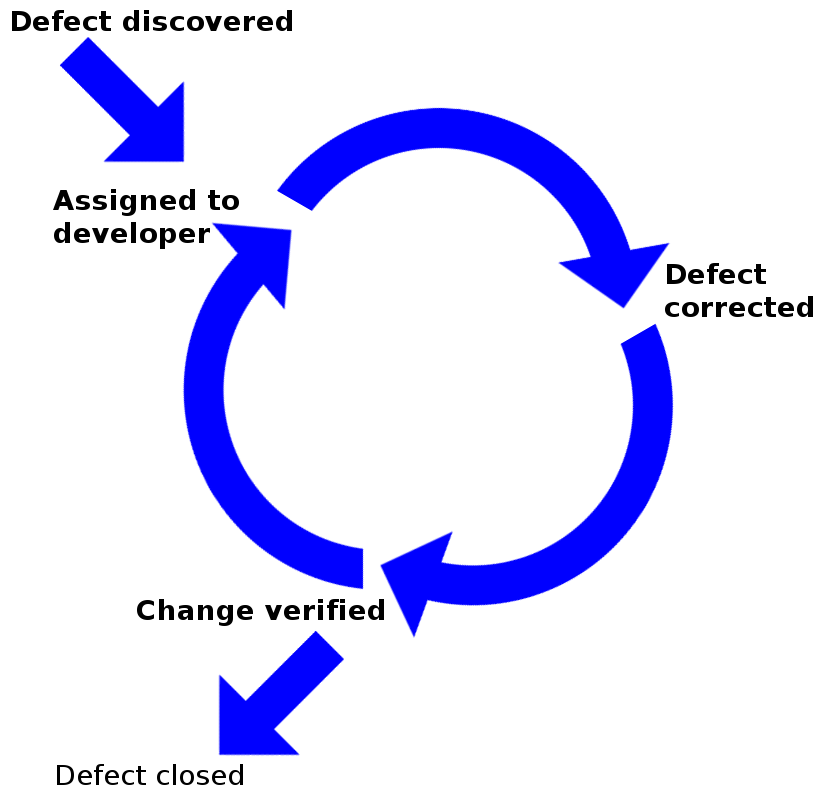
The defect life-cycle is well known:
  • Defect is identified as a departure from the requirements
  • Defect is assigned to a developer
  • Defect is corrected
  • Correct is verified
    • If not corrected re-open and re-assign to developer
  • The defect is closed

This is the correct way to manage a defect.

This is the incorrect way to manage enhancements. When QA discovers functionality not covered by the requirements then we have an issue; however, it is unlikely that it will be resolved by a developer.

Therefore assigning enhancements to developers is simply going to waste time because neither QA nor developer should be deciding requirements.

Non-Code Defect Life-cycle

There are defects that are not coding defects, this includes:
  1. Insufficient requirements
  2. Correct requirements but incorrect test plans
Enhancements are really requirement defects. Enhancements should be logged as such in the bug tracker and assigned to the person in charge of requirements (business analyst or product manager).  Those individuals should be responsible to track down how these issues should be handled.

If the requirements are correct and the test plans are defective then it should be logged as a test defect. This is tricky because QA often controls the bug tracker and may not  log errors that they commit.  This is typically reported in QA with a  functions as designed status.

At a minimum, the implementation of requirements and test defects in the bug tracker can do several positive things for you:
  1. It removes the responsibility to find a solution from development.
  2. It makes it clear how many defects are in the requirements or test plans.
  3. It reduces stress; no developer wants to be blamed for an issue that is not his.
  4. Many enhancements call for updated project plans and pushing back the deadline.

Put Responsibility Where it Belongs

The creation of requirements and test defects in the bug tracker goes a long way to cleaning up the bug tracker.  In fact, requirements and test defects represent about 1 out of 4 of defects in most systems.

The percentages break down as follows:
  • Requirements defects: 9.58%
  • Testing defects: 15.42%
The creation of requirement and test defects in the bug-tracker alleviate pressure on the engineering department and redirect it  to either the product manager or QA. Eventually enough data will accumulate in the bug-tracker to get management's attention.

At a minimum, these defect categories should help reduce the amount of fire-fighting at the end of a project..


See also:

Wednesday, 23 October 2013

It's not a bug, it's...

When does a bug become a bug?
Who decides that it is a bug?

How many legs does a lamb have if I say the tail is a leg?  The answer is 4, just because I say the tail is a leg does not make it a leg!

Bugs should be obvious, but we say It's not a bug, it's a feature because often it isn't obvious.  Watson Humphrey felt that we should use the term defect and not bug because most people don't take bugs seriously, so let's use the term defect instead.

So when does a defect become a defect?
  • When quality assurance tells you that you have a defect?
  • When product management says that it is a defect?
  • When the customer says that it is a defect?
The answer is: none of the above. Now it might turn out that there is a problem and that code needs to change, but a defect only exists if:

code behaves differently than the requirements specification

This is important because most systems are under specified (if they are specified at all :-) ). Code can only be considered a defect if it differs from the specification.  We call defects undocumented features because we know that the problem is that the requirements were never written.

Incomplete and Inconsistent Requirements

Many organizations do not create sufficiently complete requirements before starting development, either because they don't know how to capture requirements properly or because they don't have resources capable of capturing complete requirements.

Incomplete (and inconsistent) requirements and unrealistic deadlines often force developers into making decisions about how to implement features.  The end result is that developers are regularly told that they have defects in their code.

While this process is common, it is destructive.  When requirements are under specified and inconsistent developers end up needing to perform serious rework. The rework will can require dramatic changes that will impact the architecture of the code.

The time required to find a work around (if it is possible) is rarely included in the project plan. Complicating matters is that the organizations that are reluctant to spend time creating requirements also tend to underestimate their projects.  This puts tremendous pressure on the engineering department to deliver; this promotes the 5 worst practices in software development (see Stop It! No… really stop it.)

When poorly or undocumented systems require changes that are not specified we should  call them change requests rather than defects.

Only 54% of Issues are Resolved by Engineers

The attitude that all defects must be resolved by the engineering department is severely misguided.  Analysis by Capers Jones of over 18,000+ projects shows that only about 54% of all defects can be resolved by the engineers! (only the 3 highlighted rows below)

Defect Role Category Frequency Role
Requirements defect 9.58% BA/Product Management
Architecture or design defect 14.58% Architect
Code defect 16.67% Developer
Testing defect 15.42% Quality Assurance
Documentation defect 6.25% Technical Writer
Database defect 22.92% Data base administrator
Website defect 14.58% Operations/Webmaster

This means that precious time will be wasted assigning issues to developers that they can not resolve.  The time necessary to redirect the issue to the correct person is a major contributing factor to fire-fighting

Getting Control of the Defect Process

For most organizations fixing the defect process involves understanding and categorizing defects correctly. Organizations that are not tracking the different sources of defects probably have a bug tracker that has gone to hell.  Here is how you can fix that problem, see Bug Tracker Hell and How To Get Out!

At a minimum you need to implement the requirements defect, once you identify issues that are caused by poor requirements it will shine the white hot light of shame onto the resources that are capturing your requirements.

Once you realize how many requirements defects exist in your system you can begin to inform senior management about the requirements problem.

Reducing Fire-Fighting

The best way to reduce fire fighting is to start writing better requirements (or writing requirements :-) ).  To do so you need to figure out which of the following are broken:
  1. Not enough time is allocated to the requirements phase
  2. Unskilled people are capturing your requirements
In all likelihood both of these issues need to be fixed in your organization.  When requirements are incomplete and inconsistent you will have endless fire-fighting meetings involving everyone (see Root cause of 'Fire-Fighting' in Software Projects)

Stand your ground if someone tells you that you have coded a defect when there is no documentation for the requirement.

Wednesday, 18 September 2013

Are We There Yet?

We associate "are we there yet?" with kids asking incessantly if a long trip is almost over.  It is generally funny, however, it is less funny on a project that should be complete; it is even less funny if it is your project.

Projects follow distinct phases:
  1. Basic requirements are collected
  2. Project plan and end date are established
  3. Development starts
  4. Projects track to the project plan
Often, tasks start off well until they all level off at 90-95% complete and get stuck.  Management was satisfied with progress until the project stalls, they see frantic activity picking up and they start asking  "are we there yet?."

Like a family vacation, this trip is sometimes not even close to being finished.  You  expect that if 9,000 hours have been spent on a project estimated at 10,000 hours that you would be 90% done.

Surprisingly this is not the case for 7 projects out of 10 -- have you ever worked on a project where a 90% complete project plan meant the project was 90% done?

Project Plans can give the Illusion of Control


 Estimating project completion using the project plan is valid if there is a direct correlation between the project goal and the project plan. You often discover that the goal and the plan differ late in a project. Project plans and results differ because:
  • Requirements and tasks are missing
  • The project is incorrectly estimated
  • Work is performed on tasks that do not advance the project

Requirements and Tasks are Missing

Clearly missing requirements mean that more work will be necessary to get to the goal, but the time for this work is rarely added to the project deadline.

A relative of missing requirements is missing tasks, this occurs when the work breakdown structure is incomplete and more subtasks are necessary to complete a task than estimated.

In both cases, if there are 2,000 hours of missing requirements and tasks then a project initially forecasted for 10,000 hours should move the deadline to 11,000 hours.  Therefore if 9,000 hours are done then you are only 75% complete.

Project plans that show 90% complete when there are 20% of the tasks and requirements missing are really 75% complete.


Unfortunately, weak IT leadership, internal politics, and embarrassment over  poor estimates will not move the deadline and teams will have pressure put on them by overbearing senior executives to get to the original deadline even though that is not possible.

The Project is Incorrectly Estimated

There is much literature about how accurate estimates are possible and necessary to successful projects. Weak and uniformed IT leadership will cave in to senior management demands for project deadlines without formal estimates.

A typical CEO and VP Engineering interaction looks as follows:

CEO: We need feature X, how much will it cost and how long will it take to built?

VP Engineering: Well we need to define feature X properly, see how it will be implemented, determine if we have the necessary skill sets, and see what the impact to our other operations will be.  It will take time to do do this work.

CEO: We don't have time for formal estimates.  How hard can it be to add feature X?  By next Friday, I will need a ballpark estimate for time and cost.

VP Engineering: I'll see what I can come up with for next week.

Weak IT executives allow themselves to be bullied all the time by other executives that have no idea what is involved in IT projects.  The end result is an underspecified project that will be underestimated in time and cost (see Why Executive Declared Deadlines lead to Disaster)

The more inaccurate the requirements the more extra work there is to do to get to the target.  That is why short requirements processes lead to strongly shifting requirements and canceled projects (see Shift Happens).  In fact, the degree of requirements shift is equal to the chance of a project being canceled.

Work is Performed that Does Not Advance the Project

Even if a project is correctly specified, there are several activities that will be performed that will not advance the project:
  • Some requirements can not be implemented as specified and time will be spent researching and implementing work arounds
  • Some requirements will be ambiguously specified and be implemented incorrectly and need to be redone
  • Some requirements will be inconsistent and require time and analysis to establish consistent requirements
  • Infrastructure might need to be refactored when you discover that it will not support the code created later
Work executed on these activities will not advance your project and should not be counted in the total of completed hours.

So if 2,000 hours have been spent on activities that don't advance the project then if 9,000 hours have been done on a 10,000 hour project then you have really done 7,000 hours of the 10,000 hour project and you are only 70% done.

Project plans that show 90% complete when  20% has been spent on unproductive tasks are really 70% complete.

Unfortunately...

On projects you will have both missing tasks and unproductive activities.  So if 2,000 hours are unproductive and 2,000 hours are missing in a 10,000 hour project where 9,000 hours have been done then you have only done 7,000 hours on a 12,000 hour project you are only 58.3% done.

Project plans that show 90% complete when there are 20% missing requirements and 20% time spent unproductive tasks are really 53% complete.

Many of you have been in this situation before, you know that the project plan states that you are 90% done but you know that you are not even close to finishing the project.

 Not Changing the Deadline Leads to Worst Practices

Whether a project is off course because of missing activities or non-productive activities, not changing the project end date will lead to schedule pressure as the project advances and people slowly start to realize that you are not going to make it.


When it becomes clear that a project can't make it's original deadline many organizations will start common but deadly practices.  Excessive schedule pressure often leads to the following bad practices (see Stop It! No... Really stop it.):
  • Friction within the team
  • Friction amongst the managers
  • Inadequate communication with  stakeholders
  • Layoffs of key personnel

Solutions

There are only a few cures for the 'Are we there yet?' problem:
Intestinal Fortitude
  1. IT management with the intestinal fortitude to hold out for the creation of proper work breakdown structures and formal estimates
  2. Proper requirement processes that yield complete, consistent, and concise requirements
  3. Proper change management processes to alter the project deadline when missing tasks and non-productive activities are encountered
Failure to comply with these 3 principles means that you will continue to be subject to chaotic environments where 7 out of 10 projects fail (see Executives: Understanding your Chances of a Successful Project)

Thursday, 15 November 2012

Inspections are not Optional

Every developer is aware that code inspections are possible, some might have experienced the usefulness of code inspections, however, the fact is that inspections are not optional.

Without inspections your defect removal rate will stall out at 85% of defects removed; with inspections defect removal rates of 97% have been achieved.

Code inspections are only the most talked about type of inspection; the reality is that all artifacts from all phases of development should be inspected prior to being used.  Inspections are necessary because software is intangible and it is not once everything is coded that you want to notice problems.

In the physical world it is easier to spot problems because they can be tangible.  For example, if you have specified marble tiles for your bathroom and you see the contractor bring in a pile of ceramic tiles then you know something is wrong.  You don't need the contractor to install the ceramic tiles to realize that there is a problem.

In software, we tend to code up an entire set of functionality, demonstrate it, and then find out that we have built the wrong thing!  If you are working in a domain with many requirements then this is inevitable, however, many times we can find problems through inspection before we create the wrong solutions Let's look at some physical examples and then discuss their software equivalents. 

Requirement Defects

The requirements in software design are equivalent to the blueprints that are given to a contractor.  The requirements specify the system to be built, however, if those requirements are not inspected then you can end up with the following:

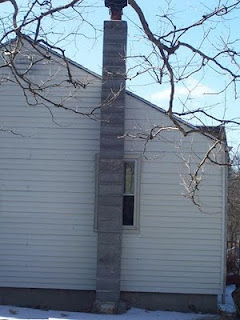
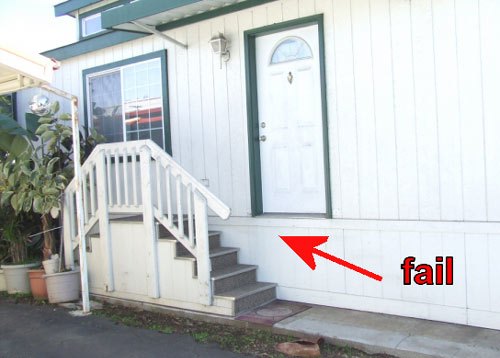
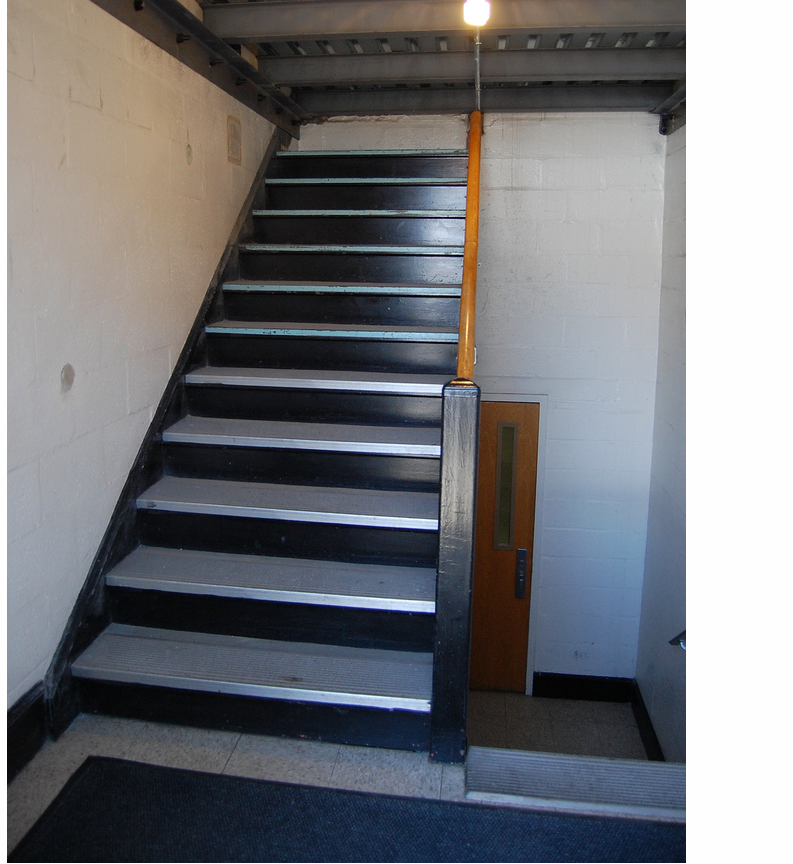
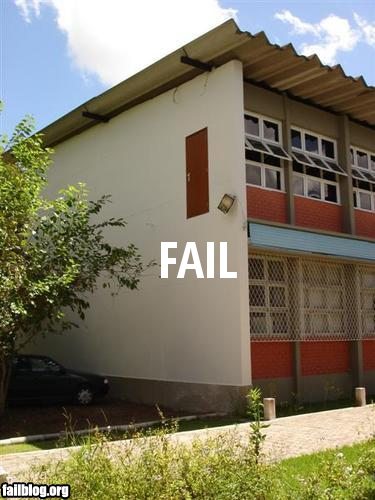
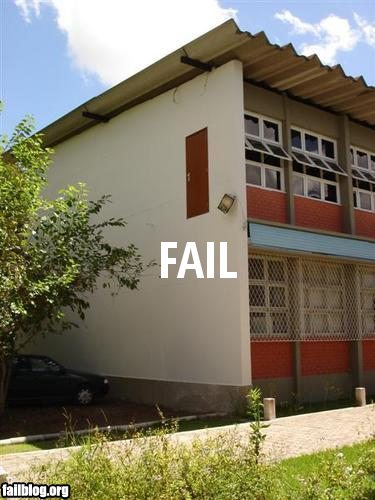
Balcony no Door Missing Landing Chimney Covering Window
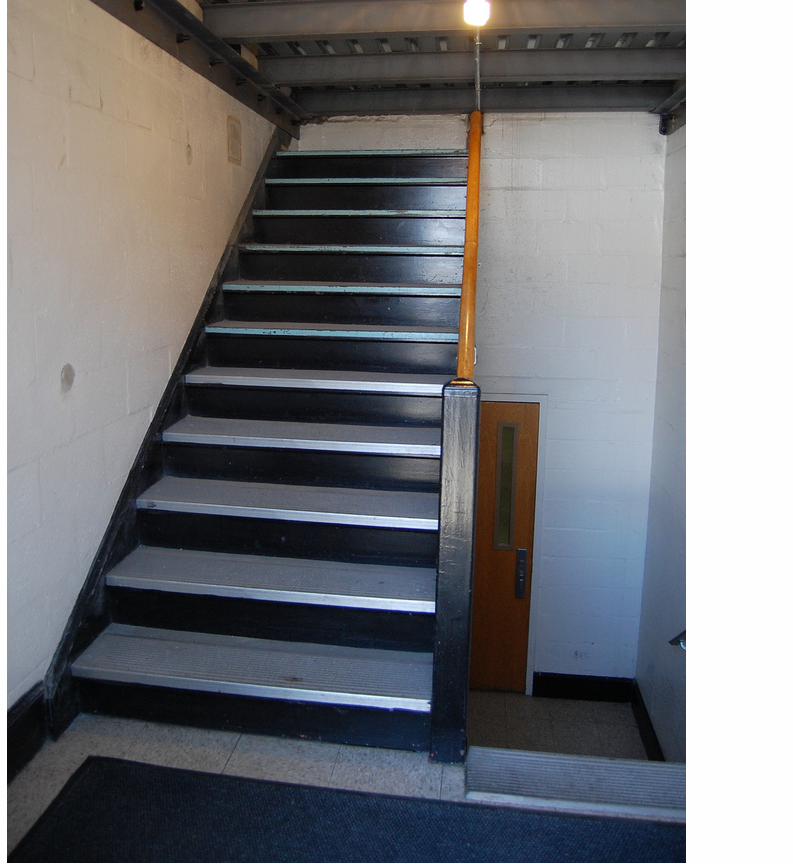
Stairs Displaced Stairs to Ceiling Door no Balcony

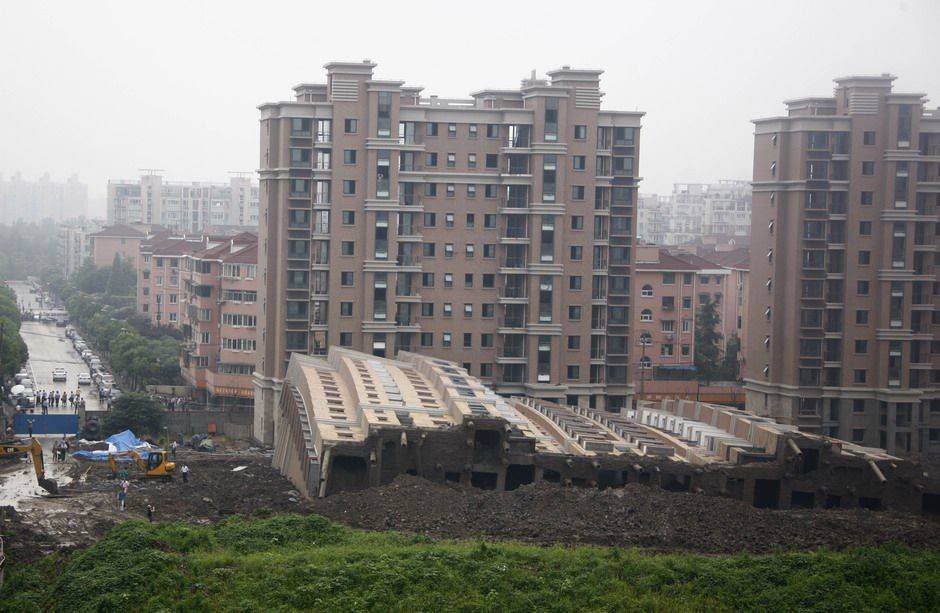
All of the above pictures represent physical engineering failures.  Every one of these disasters could have been identified in the blueprints if a simple inspection had been done. Clearly it must have become clear to the developers that the building features specified by the requirements were incompatible, but they completed the solution anyways.

Balcony no Door

This design flaws can be caused by changing requirements; here there is a balcony feature that has no access to it.  In Balcony no Door it is possible that someone noticed that there was sufficient room for a balcony on the lower floor and put it into one set of plans. The problem was that the developers that install the sliding doors did not have their plans updated.

Here the changed requirement did not lead to an inspection to see if there was an inconsistency introduced by the change.

Door no Balcony

In Door no Balcony something similar probably happened, however, notice that the two issues are not symmetric.  In Balcony no Door represents a feature that is inaccessible because no access was created, i.e. the missing sliding door.

In Door no Balcony we have a feature that is accessible but dangerous if used. In this case a requirements inspection should have turned up the half implemented feature and either: 1) the door should have been removed from the requirements, or 2) a balcony should have been added.

Missing Landing


The Missing Landing occurs because the requirements show a need for stairs, but does not occur to the architect that there is a missing landing.  Looking at a set of blueprints gives you a two dimensional view of the plan and clearly they drew in the stairs.  To make the stairs usable requires a landing so that changing direction is simple.  This represents a missing requirement that causes another feature to be only partially usable.

This problem should have been caught by the architect when the blueprint was drawn up. However, barring the architect locating the issue a simple checklist and inspection of the plans would have turned up the problem.

Stairs to Ceiling

The staircase goes up to a ceiling and therefore is a useless feature.  Not only is the feature incomplete because it does not give access to the next level but also they developers wasted time and effort in building the staircase.

If this problem had been caught in the requirements stage as an inconsistency then either the staircase could have been removed or an access created to the next floor.  The net effect is that construction starts and the developers find the inconsistency when it is too late.

At a minimum the developers should have noticed that the stairway did not serve any purpose and not build the staircase which was a waste of time and materials.

Stairs Displaced

Here we have a clear case of changed requirements.  The stairs were supposed to be centered under the door, in all likelihood plans changed the location of the door and did not move the dependent feature.

When the blueprint was updated to move the door the designer should have looked to see if there was any other dependent feature that would be impacted by the change.

Architectural Defects

Architectural defects come from not understanding the requirements or the environment that you are working with.  In software, you need to understand the non-functional requirements behind the functional requirements -- the ilities of the project (availability, scalability, reliability, customizability, stability, etc). Architectural features are structural and connective.  In a building the internal structure must be strong enough to support the building, i.e. foundation and load bearing walls.

Insufficient foundation Insufficient structure Connectivity problem

Insufficient Foundation

Here the building was built correctly, however, the architect did not check the environment to see if the foundation would be sufficient for the building. The building is identical to the building behind it, so odds are they just duplicated the plan without checking the ground structure.

The equivalent in software is to design for an environment that can not support the functionality that you have designed.  Even if that functionality is perfect, if the environment doesn't support it you will not succeed.


Insufficient Structure

Here the environment is sufficient to hold up the building, however, the architect did not design enough structural strength in the building. The equivalent in software design is to choose architectural components that will not handle the load demanded by the system.

For example, distributed object technologies such as CORBA, EJB, and DCOM provided a way to make objects available remotely, however, the resulting architectures did not scale well under load.

Connectivity Problem

Here a calculation error was made when the two sides of the bridge were started.  When development got to the center they discovered that one side was off and you have an ugly problem joining the two sides.


The equivalent for this problem is when technologies don't quite line up and require awkward and ugly techniques to join different philosophical approaches.  In software, a classic problem is mapping object-oriented structures into relational databases.  The philosophical mismatch accounts for large amounts of code to translate from one scheme into the other.


Coding Defects

Coding defects are better understood (or at least yelled about :-), so I won't spend too much time on them.  Classic coding defects include:
  • Uninitialized data
  • Uncaught exceptions
  • Memory leaks
  • Buffer overruns
  • Not freeing up resources
  • Concurrency violations
  • Insufficient pathways, i.e. 5 conditions but only 4 coded pathway
Many of these problems can be caught with code inspections and static code inspection tools.

Testing Defects

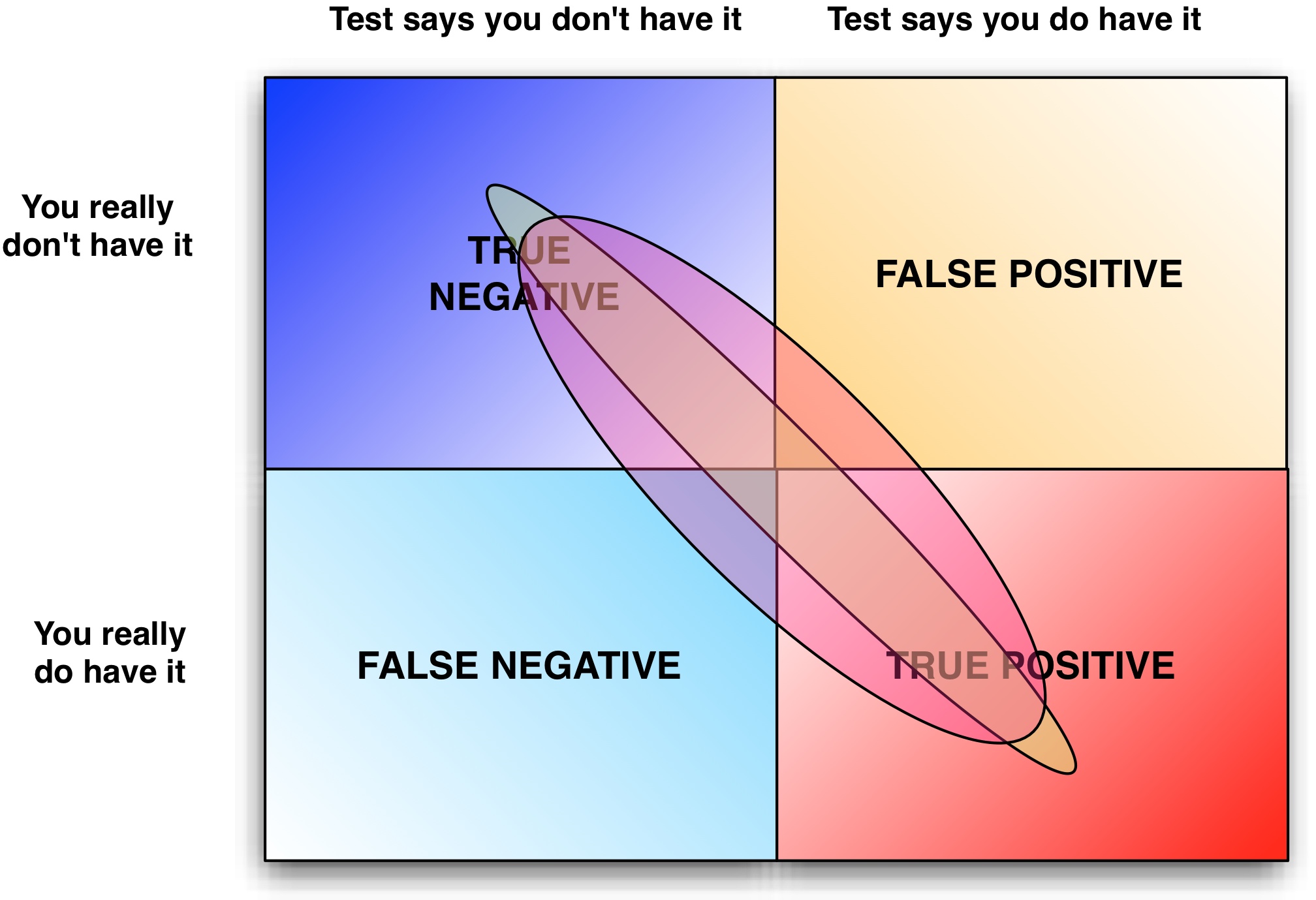
Testing defects occur when the test plan flags a defect that is a phantom problem or a false positive. This often occurs when requirements are poorly documented and/or poorly understood and QA perceives a defect when there is none.

False positives slow down development.

The reverse also happens where requirements are not documented and QA does not perceive a defect, i.e. false negative.

False negatives can slip through to your customers..

Both false positives and negatives can be caught by inspecting the requirements and comparing them with the test cases.

Root Cause of Firefighting

When inspections are not done in all phases of software development there will be fire-fighting in the project in the zone of chaos.

Most software organizations only record and test for defects during the Testing phase.

Unfortunately, at this point you will detect defects in all previous phases at this point.


QA has a tendency to assume that all defects are coding defects -- however, the analysis of 18,000+ projects does not confirm this.  In The Economics of Software Quality, Capers Jones and Olivier Bonsignour show that defects fall into different categories. Below we give the category, the frequency of the defect, and the business role that will address the defect.

Defect Role Category Frequency Role
Requirements defect 9.58% BA/Product Management
Architecture or design defect 14.58% Architect
Code defect 16.67% Developer
Testing defect 15.42% Quality Assurance
Documentation defect 6.25% Technical Writer
Database defect 22.92% DBA
Website defect 14.58% Operations/Webmaster

Note, only the bolded rows above are assigned to developers.

Notice that fully 25% of the defects (requirements, architecture) occur before coding even starts.  These defects are just like the physical defects shown above and only manifest themselves once the code needs to be written.

It is much less expensive to fix requirements and architecture problems before coding.

Also, only about 54% of defects are actually resolvable by developers, so by assigning all defects to the developers you will waste time 46% of the time when you discover that the developer can not resolve the issue.

Fire-fighting is basically when there need to be dozens of meetings that pull together large numbers of people on the team to sort out inconsistencies. These inconsistencies will lie dormant because there are no inspections.

Of course, when all the issues come out, there are so many issues from all the phases of development that it is difficult to sort out the problem!

Learn how to augment your Bug Tracker to help you to understand where your defects are coming from in Bug Tracker Hell and How to Get Out!

Solutions

There are two basic solutions to reducing defects:
  1. Inspect all artifacts
  2. Shorten your development cycle
The second solution is the one adopted by organizations that are pursuing Agile software development.  However, shorter development cycles will reduce the amount of fire-fighting but they will only improve code quality to a point.

In The Economics of Software Quality the statistics show that defect removal is not effective in most organizations.  In fact, on large projects the test coverage will drop below 80% and the defect removal efficiency is rarely above 85%.   So even if you are using Agile development you will still not achieving a high level of defect removal and will be limited in the software quality that you can deliver.

Agile development can reduce fire-fighting but does not address defect removal

Inspect All Artifacts

Organizations that have formal inspections of all artifacts have achieved defect removal efficiencies of 97%! If you are intent on delivering high quality software then inspections are not optional. Of course, inspections are only possible for phases in which you have actual artifacts. Here are the artifacts that may be associated with each phase of development:

Phase Artifact
Requirements use case, user story, UML Diagrams (Activity, Use Case)
Architecture or design UML diagrams (Class, Interaction, Deployment)
Coding UML diagrams (Class, Interaction, State, Source Code)
Testing Test plans and cases
Documentation Documentation
Database Entity-Relationship diagrams, Stored Procedures

Effective Inspections

Inspections are only effective when the review process involves people who know what they are looking for and are accountable for the result of the inspection.  People must be trained to understand what they are looking for and effective check lists need to be developed for each artifact type that you review, e.g. use case inspections will be different than source code reviews.

Inspections must have teeth otherwise they are a waste of time.  For example, one way to put accountability into the process is to have someone other than the author be accountable for any problems found.  There are numerous resources available if you decide that you wish to do inspections.

Conclusion

The statistics overwhelming suggest that inspections will not only remove defects from a software system but also prevent defects from getting in.  With inspections software defect removal rates can achieve 97% and without inspections you are lucky to get to 85%.

Since IBM investigated the issue in 1973, it is interesting to note that teams trained in performing inspections eventually learn how to prevent injecting defects into the software system.  Reduced injection of defects into a system reduces the amount of time spent in fire-fighting and in QA.

You can only inspect artifacts that you take the time to create.  Many smaller organizations don't have any artifacts other than their requirements documents and source code. Discover which artifacts need to be created by augmenting your Bug Tracker (see Bug Tracker Hell and How To Get Out!).   Any phase of development where significant defects are coming from should be documented with an appropriate artifact and be subject to inspections.


Good books on how to perform inspections:

All statistics quoted from The Economics of Software Quality by Capers Jones and Olivier Bonsignour:
Capers Jones can be reached by sending me an email: Dalip Mahal


Other Engineering Disasters
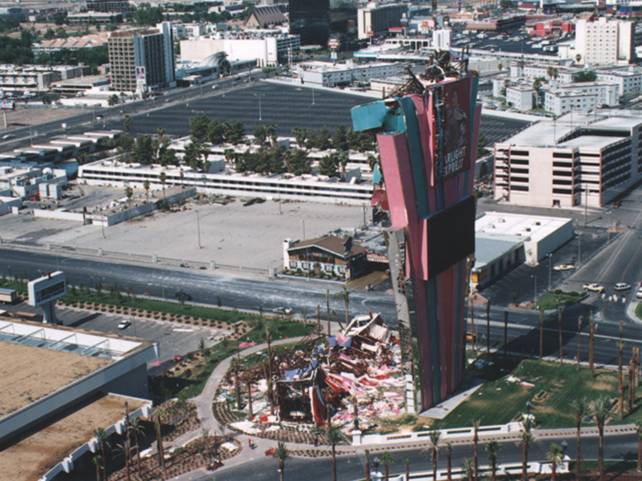
SkyLab (1979) NASA's planners failed to account for sunspot activity causing drag on the satellite during a solar warming cycle causing the satellite to crash.Cost: $10 billion in 2010 inflation adjusted dollars.
Tacoma Narrows Bridge (1948) Engineers failed to account for wind sheer and the Tacoma Narrows Bridge failed spectaculary when high winds caused the bridge to resonate and oscillate in perfect sine waves before breaking and falling apart. Cost: $100 million in 2011 inflation adjusted dollars. Video
The Vasa (1628) The Vasa was built top-heavy with insufficient ballast and foundered and sunk in 32 meters of water just 120 meters from shore as soon as she encountered a wind stronger than a breeze, just a few minutes after first setting sail on her maiden voyage on August, 10th, 1628. Despite clearly lacking stability even in port, she was allowed to set sail.